



Universal Intel Chipset Drivers Updater
- FirstEver
-
 Auteur du sujet
- Hors Ligne
- The Best Poster
-

Enregistré
- Messages : 119
- Thanks: 206
Re: Universal Intel Chipset Drivers Updater
il y a 2 mois 3 semaines - il y a 2 mois 3 semaines
Release: v2026.08.0017
🆕 What's New
Detection Fix — FriendlyName Keyword Filter Silently Dropped Legitimate Devices
The device detection step (Get-IntelChipsetHWIDs) used to pre-filter every candidate Intel device by checking whether its FriendlyName contained one of a handful of keywords: "Chipset", "LPC", "PCI Express Root Port", "PCI-to-PCI bridge", "Motherboard Resources". Any live, fully functioning Intel System-class device whose FriendlyName didn't happen to contain one of those words was silently dropped — before it was ever even checked against the HWID database.
This surfaced through a user report (thanks again to rvail for the detailed logs): Driver Genius Free Edition flagged three Intel System devices as outdated on a Z270 desktop — 1901 (PCIe Controller x16), 191F (Host Bridge/DRAM Registers), and 1911 (Gaussian Mixture Model) — while my updater reported the system as fully up to date. A full, unfiltered PnP device dump confirmed all three were live and functioning (Status: OK) — the updater's own name-based filter was the reason they never showed up, nothing else.
Performance Improvement
Version-checking (Get-CurrentINFVersion) previously re-scanned every PnP device on the system, from scratch, for every single detected Intel device — an O(n²) cost. On the X79 system above, going from 12 to 59 correctly-detected devices meant this re-scan ran roughly 5x more often, and detection time went from ~30s to over 2 minutes. Fixed by reusing the device object already collected during initial enumeration instead of searching for it again — detection is now O(n).
Display Improvements
Release Changelog: here
Full Changelog: here
P.S.
The next release will include a `-download` parameter for downloading detected Intel Chipset Device Software installers.
This will be useful for legacy chipsets, as newer versions of the installers are no longer being produced.
🆕 What's New
Detection Fix — FriendlyName Keyword Filter Silently Dropped Legitimate Devices
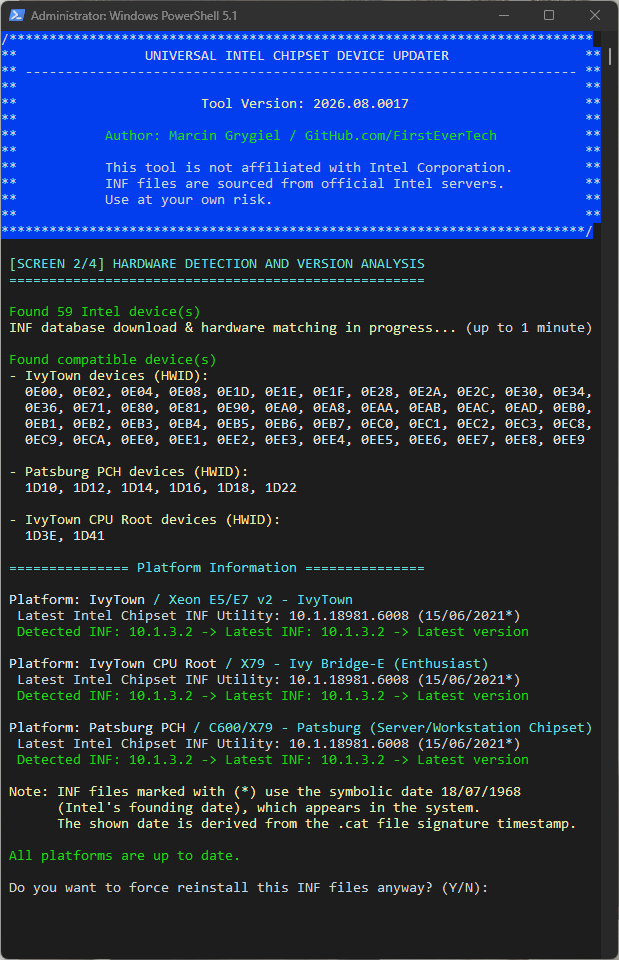
The device detection step (Get-IntelChipsetHWIDs) used to pre-filter every candidate Intel device by checking whether its FriendlyName contained one of a handful of keywords: "Chipset", "LPC", "PCI Express Root Port", "PCI-to-PCI bridge", "Motherboard Resources". Any live, fully functioning Intel System-class device whose FriendlyName didn't happen to contain one of those words was silently dropped — before it was ever even checked against the HWID database.
This surfaced through a user report (thanks again to rvail for the detailed logs): Driver Genius Free Edition flagged three Intel System devices as outdated on a Z270 desktop — 1901 (PCIe Controller x16), 191F (Host Bridge/DRAM Registers), and 1911 (Gaussian Mixture Model) — while my updater reported the system as fully up to date. A full, unfiltered PnP device dump confirmed all three were live and functioning (Status: OK) — the updater's own name-based filter was the reason they never showed up, nothing else.
- Filter removed entirely — every Intel (VEN_8086) System-class device with Status: OK is now passed straight to database matching, no keyword pre-check
- Same class of gap affected other device-name families across multiple generations, not just this one case: the GMM (Gaussian Mixture Model), Thermal, Northpeak, LPSS, and DmaSecExtension device families — none of these FriendlyNames contain the old keyword list
- Tested on a triple-platform X79 system (IvyTown / Patsburg PCH / IvyTown CPU Root): detected device count went from 12 → 59, all correctly matched to the same three known platforms
Performance Improvement
Version-checking (Get-CurrentINFVersion) previously re-scanned every PnP device on the system, from scratch, for every single detected Intel device — an O(n²) cost. On the X79 system above, going from 12 to 59 correctly-detected devices meant this re-scan ran roughly 5x more often, and detection time went from ~30s to over 2 minutes. Fixed by reusing the device object already collected during initial enumeration instead of searching for it again — detection is now O(n).
Display Improvements
- HWID lists now wrap at 12 per line instead of one unreadable wall of text (some platforms report 40+ HWIDs now that detection is complete)
- Platform names highlighted in yellow for easier scanning
- Download/parsing status merged into a single, more accurate progress message
Release Changelog: here
Full Changelog: here
P.S.
The next release will include a `-download` parameter for downloading detected Intel Chipset Device Software installers.
This will be useful for legacy chipsets, as newer versions of the installers are no longer being produced.
Dernière édition: il y a 2 mois 3 semaines par FirstEver.
Les utilisateur(s) suivant ont remercié: duttyend, fikotr74
Connexion ou Créer un compte pour participer à la conversation.
- rvail
-

- Hors Ligne
- Big Poster
-

Enregistré
- Messages : 40
- Thanks: 35
Re: Universal Intel Chipset Drivers Updater
il y a 2 mois 3 semaines - il y a 2 mois 3 semaines
Thanks much for the updated (August 2026) utility.
Note: the Driver Genius (free version) includes a useful function that continues working even after the initial 5 day "trial period" after first software installation.
It can detect and optionally clean out "Older driver packages" & "Invalid device data".
So: you may want to run the Driver Genius utility after having run the "Universal Intel Chipset Drivers Updater" & rebooting the PC.
Another free driver updater tool "Driver Fusion" detects certain device drivers that Driver Genius doesn't.
But: Driver Genius includes a unique obsolete driver cleanup function, as described above.
Note: the Driver Genius (free version) includes a useful function that continues working even after the initial 5 day "trial period" after first software installation.
It can detect and optionally clean out "Older driver packages" & "Invalid device data".
So: you may want to run the Driver Genius utility after having run the "Universal Intel Chipset Drivers Updater" & rebooting the PC.
Another free driver updater tool "Driver Fusion" detects certain device drivers that Driver Genius doesn't.
But: Driver Genius includes a unique obsolete driver cleanup function, as described above.
Dernière édition: il y a 2 mois 3 semaines par rvail.
Connexion ou Créer un compte pour participer à la conversation.
- rvail
-
- Hors Ligne
- Big Poster
-
Enregistré
- Messages : 40
- Thanks: 35
Re: Universal Intel Chipset Drivers Updater
il y a 2 mois 3 semaines
An error was discovered running your Intel Chipset Driver updater utility.
This appeared when running on the Z270 chipset motherboard, where it appears to be looking for a 64-bit installer, but your program is only finding a 32-bit version (?)
See attached screen shots:
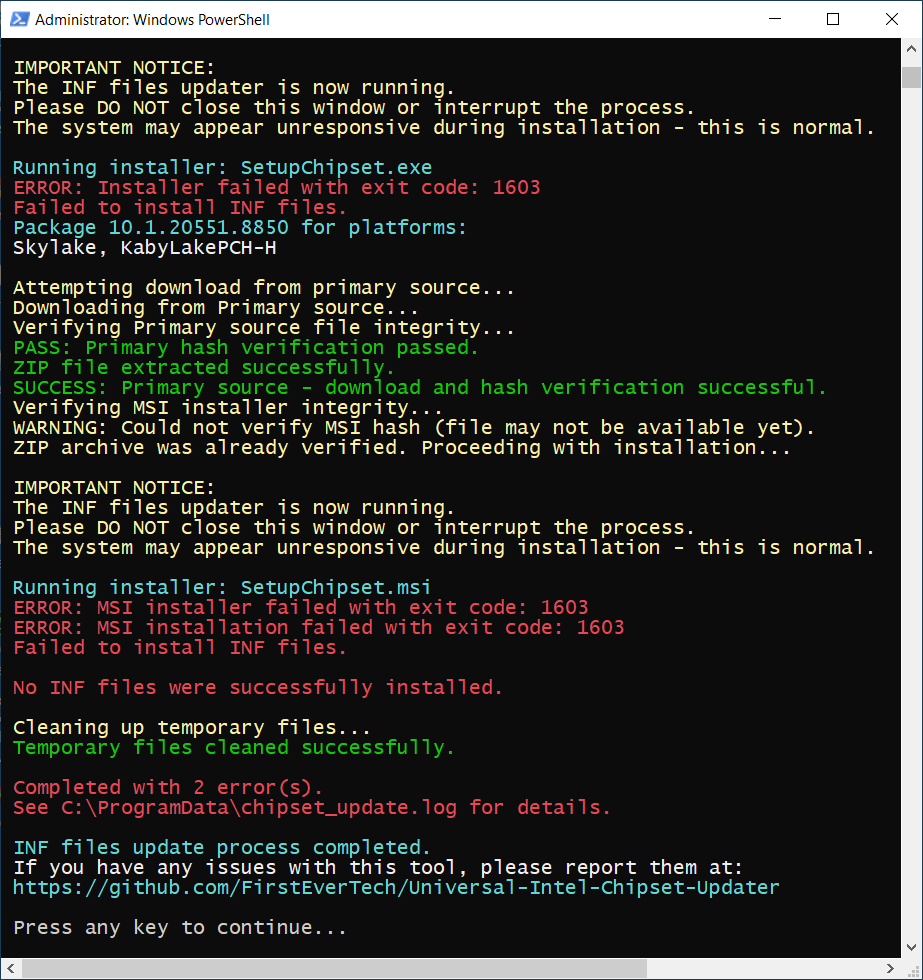
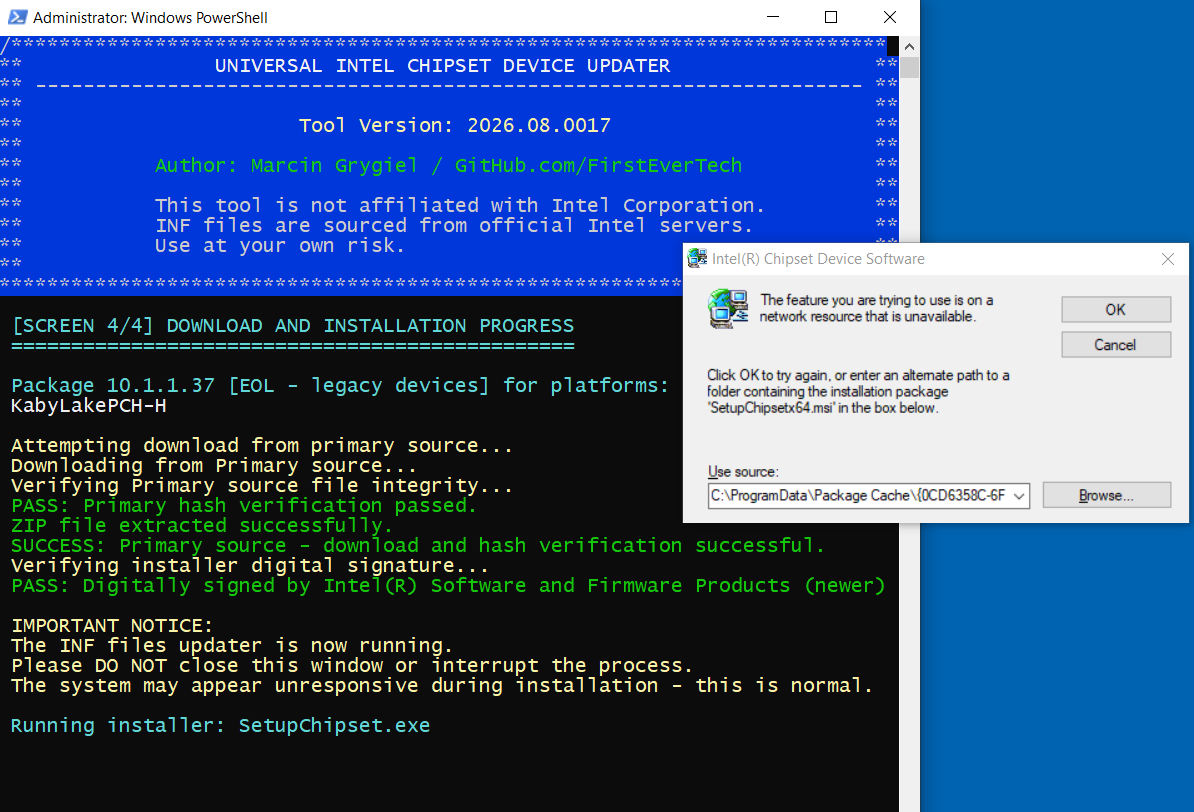
This appeared when running on the Z270 chipset motherboard, where it appears to be looking for a 64-bit installer, but your program is only finding a 32-bit version (?)
See attached screen shots:
Les utilisateur(s) suivant ont remercié: duttyend
Connexion ou Créer un compte pour participer à la conversation.
- FirstEver
-
Auteur du sujet
- Hors Ligne
- The Best Poster
-
Enregistré
- Messages : 119
- Thanks: 206
Re: Universal Intel Chipset Drivers Updater
il y a 2 mois 3 semaines - il y a 2 mois 3 semaines
I see the problem involves some HWID EOL issue that requires downloading and installing an older installer.
I even ran a simulation that will detect x79 EOL devices for my platform.
So, just like yours, there will be HWIDs that require a new MSI installer and an old EXE installer for EOL devices.
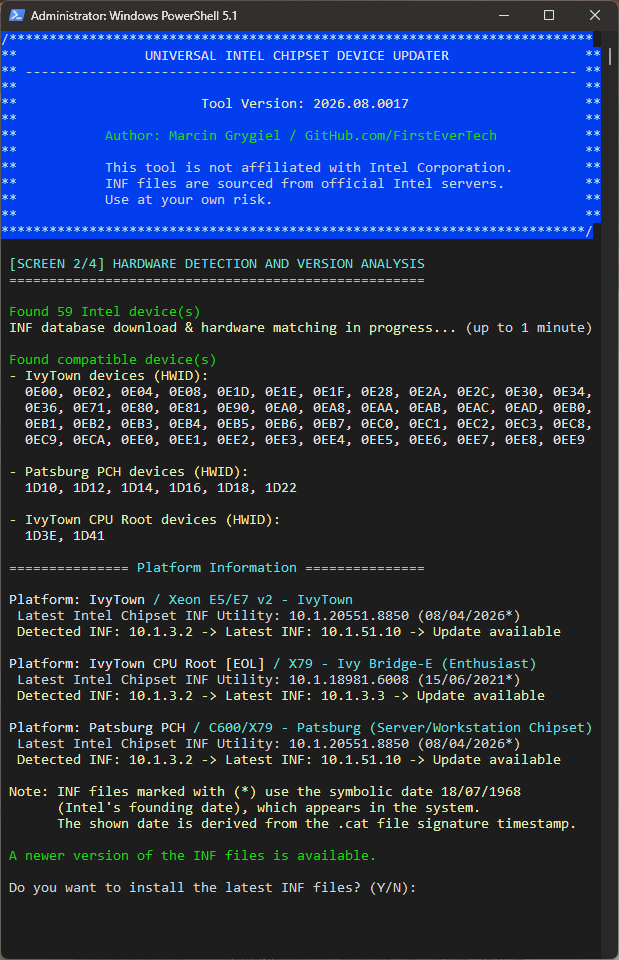
As you can see, the installer successfully installed the EOL INF using the old EXE installer, and then used the new MSI installer to simulate updating the remaining INF. The 10.1.20551.8850 installer did indeed install, but it didn't have any INF files for my platform, so it didn't make any changes.
Most importantly, no error occurred!
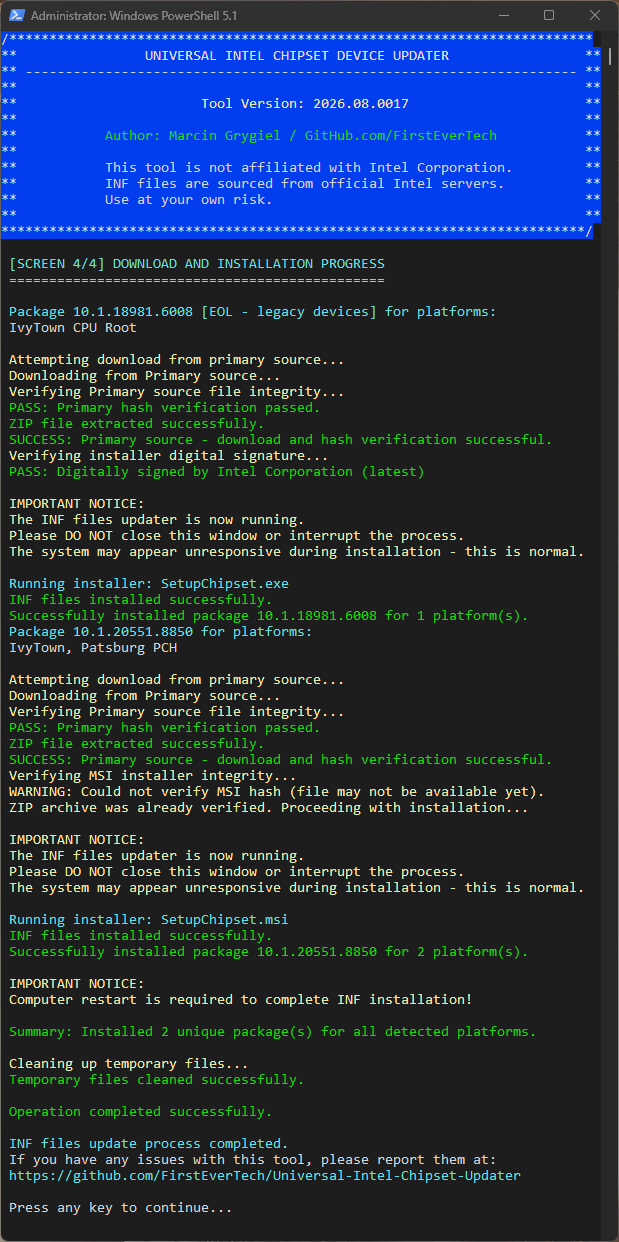
I'm starting to suspect that you simply have a corrupted previous Intel Chipset Software Device installer installed on your computer.
Try uninstalling "Intel Chipset Device Software" and "SetupChipset" in Program and Features and run my Updater again.
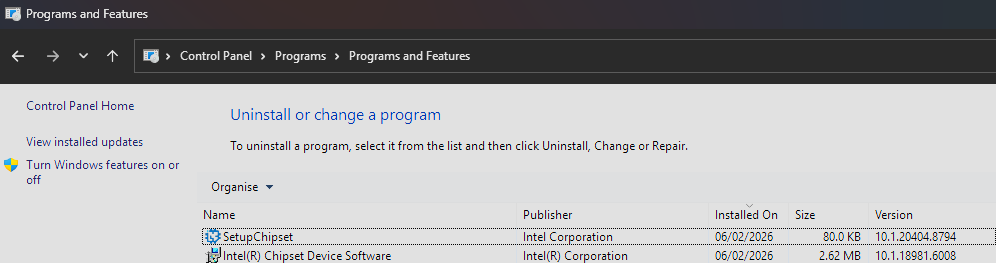
The log from you will still be helpful...
FUN FACT
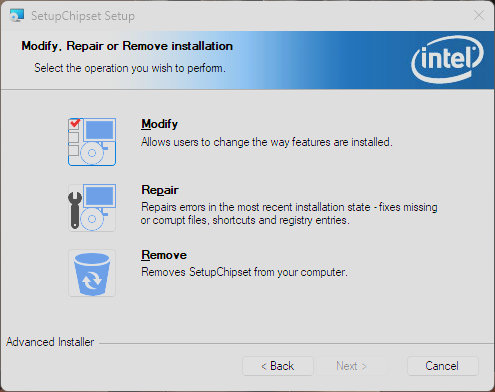
While testing all dependencies, I discovered a bug in the new EXE installer from Intel (108 MB). No matter how many times you install it, it will never detect that it is already installed, so you'll never see the "Modify, Repair, or Remove" maintenance dialog. Instead, you'll always be presented with the license agreement and the option to install the product. Do they even have a software QC department?
However, if you extract the MSI installer from the package and install it directly, you'll see the "Modify, Repair, or Remove" dialog the next time you run the MSI installer.
Upon reflection, Intel blocked MSI so that it cannot be run individually - so you will never actually see this window.
- You have the latest INF files installed for all HWIDs (from installer 10.1.20551.8850)
- The updater detects an update for a specific EOL HWID—an INF file that is missing from the latest Intel installer (MSI).
- It is clearly visible (Screen 4) that the updater is trying to download and install the missing EOL INF from the 10.1.1.37 installer.
The error occurs during the attempt to install SetupChipsetx64.msi—meaning it is trying to use the new installer.
I need to check the code again... everything seems to be okay.
- Go to %ProgramData%\ and delete the file chipset_update.log
- Run my updater again with the -debug flag added (e.g. .\universal-intel-chipset-device-updater.ps1 -debug) — you should get the same error again, but this way the log will capture a lot more detail
- Send me the new %ProgramData%\chipset_update.log file so I can analyze it.
I even ran a simulation that will detect x79 EOL devices for my platform.
So, just like yours, there will be HWIDs that require a new MSI installer and an old EXE installer for EOL devices.
As you can see, the installer successfully installed the EOL INF using the old EXE installer, and then used the new MSI installer to simulate updating the remaining INF. The 10.1.20551.8850 installer did indeed install, but it didn't have any INF files for my platform, so it didn't make any changes.
Most importantly, no error occurred!
I'm starting to suspect that you simply have a corrupted previous Intel Chipset Software Device installer installed on your computer.
Try uninstalling "Intel Chipset Device Software" and "SetupChipset" in Program and Features and run my Updater again.
The log from you will still be helpful...
FUN FACT
While testing all dependencies, I discovered a bug in the new EXE installer from Intel (108 MB). No matter how many times you install it, it will never detect that it is already installed, so you'll never see the "Modify, Repair, or Remove" maintenance dialog. Instead, you'll always be presented with the license agreement and the option to install the product. Do they even have a software QC department?
However, if you extract the MSI installer from the package and install it directly, you'll see the "Modify, Repair, or Remove" dialog the next time you run the MSI installer.
Upon reflection, Intel blocked MSI so that it cannot be run individually - so you will never actually see this window.
Dernière édition: il y a 2 mois 3 semaines par FirstEver.
Les utilisateur(s) suivant ont remercié: duttyend
Connexion ou Créer un compte pour participer à la conversation.
- rvail
-
- Hors Ligne
- Big Poster
-
Enregistré
- Messages : 40
- Thanks: 35

Dernière édition: il y a 2 mois 3 semaines par rvail.
Les utilisateur(s) suivant ont remercié: duttyend
Connexion ou Créer un compte pour participer à la conversation.
Temps de génération de la page : 0.085 secondes