



NVME USB drives Realtek RTL9210/RTL9220 Firmware Version 1.xx
- waldyrdias@msn.com
-

- User
-

Public
- Thanks: 0
Re: NVME USB drives Realtek RTL9210/RTL9220 Firmware Version 1.xx
3 years 1 month ago
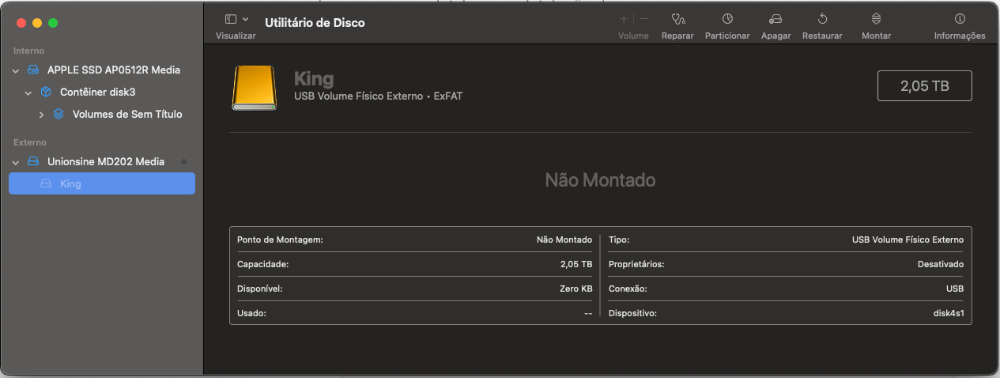
I updated my Unionsine MD202 with Realtek RTL9210B chipset firmware Version 1.32.49.140423, but macos won't mount the nvme drive. Could someone help me please.
The configuration is like this.
;Configure Start
;=================FW Configure=================
U2PHY = 02 f4 9b e0 e1
U3PHY = 02 d4 09 00 d5 00 80
VID = 0xbda
PID = 0x9210
MANUFACTURE = "Unionsine"
SCSI_VENDOR = " "
PRODUCT = "MD202"
SCSI_PRODUCT = "Unionsine MD202"
;"0123" for Dec, "0x0123" for Hex, max 12 digits
SERIAL = "N9D0AP042502"
DISK_HOTPLUG = 0x0
LED = 0x2
PINMUX1 = 0x0
PINMUX2 = 0x0
U2_MAXPWR = 0xfa
U3_MAXPWR = 0x0
ASPMDIS = 0x0
;10 minutes of idle time will disable disk power
DISK_IPS_THRES = false
;EN_UPS = n/a
;PD = n/a
HW_LED_CFG = false
CUSTOMIZED_LED is 15 bytes = 0x80000081
CUSTOMIZED_LED = 07 00
SUSPEND_LED_OFF = 0x0
FAN = false
DIS_SHOW_EMPTY_DISK = false
FORCE_SATA_NORMAL_DMA = false
UART_DBG_PIN = 0x5
FINGER_PRINT_EN = false
;=================Tool Configure=================
DISCONN_FORCE_USB2 = 0x0
FORMAT_DISK = n
INC_SERIAL = false
;PARTITION: GPT, MBR
PARTITION = "GPT"
;FORMAT: NTFS, exFAT
FORMAT = "exFAT"
;LABEL max allowed - characters
LABEL = "My USB"
The configuration is like this.
;Configure Start
;=================FW Configure=================
U2PHY = 02 f4 9b e0 e1
U3PHY = 02 d4 09 00 d5 00 80
VID = 0xbda
PID = 0x9210
MANUFACTURE = "Unionsine"
SCSI_VENDOR = " "
PRODUCT = "MD202"
SCSI_PRODUCT = "Unionsine MD202"
;"0123" for Dec, "0x0123" for Hex, max 12 digits
SERIAL = "N9D0AP042502"
DISK_HOTPLUG = 0x0
LED = 0x2
PINMUX1 = 0x0
PINMUX2 = 0x0
U2_MAXPWR = 0xfa
U3_MAXPWR = 0x0
ASPMDIS = 0x0
;10 minutes of idle time will disable disk power
DISK_IPS_THRES = false
;EN_UPS = n/a
;PD = n/a
HW_LED_CFG = false
CUSTOMIZED_LED is 15 bytes = 0x80000081
CUSTOMIZED_LED = 07 00
SUSPEND_LED_OFF = 0x0
FAN = false
DIS_SHOW_EMPTY_DISK = false
FORCE_SATA_NORMAL_DMA = false
UART_DBG_PIN = 0x5
FINGER_PRINT_EN = false
;=================Tool Configure=================
DISCONN_FORCE_USB2 = 0x0
FORMAT_DISK = n
INC_SERIAL = false
;PARTITION: GPT, MBR
PARTITION = "GPT"
;FORMAT: NTFS, exFAT
FORMAT = "exFAT"
;LABEL max allowed - characters
LABEL = "My USB"
Please Connexion or Create an account to join the conversation.
- admin
-
 Topic Author
- Offline
- Admin
-

Administrateur
- Fdrsoft (Admin)
- Posts: 674
- Thanks: 424
Re: NVME USB drives Realtek RTL9210/RTL9220 Firmware Version 1.xx
3 years 1 month ago
did you try the default configuration with the realtek.....cfg file
Asus Z890 ProArt, Intel Cpu Core Ultra 7 265K, Memoires 32Go Corsair DDR5 (6000Mhz CL30), Water-cooling Thermaright, nVidia Geforce RTX4060, Alimentation Gigabyte 850W, Samsung SSD 990 Pro, SSD9100 Pro, Steelserie Pro , Souris Razer, Boitier HUMMER, HP Steelserie, Free Fibre Ultra (8Go/8Go), Lan 10Gb, Cable CAT8/7, Switch 10/5/2.5Gbps, Casque Philips Fedelis.
The following user(s) said Thank You: waldyrdias@msn.com
Please Connexion or Create an account to join the conversation.
- wade7575
-
- Offline
- Big Poster
-

Enregistré
- Posts: 40
- Thanks: 6
Re: NVME USB drives Realtek RTL9210/RTL9220 Firmware Version 1.xx
3 years 1 month ago
What config file did you use,if you go to station drivers and type in RTL9210 and then start downloading every download for the RTL2910 chip you will that one has a massive amount of config files in it and then use file HIKSEMI_MD202.cfg to reflash your device.
I can't remember which download has it in it but one has a massive amount of those files in it,if you give me your email I don't mind emailing the file I have it save and it is the original file.
I can't remember which download has it in it but one has a massive amount of those files in it,if you give me your email I don't mind emailing the file I have it save and it is the original file.
The following user(s) said Thank You: admin, waldyrdias@msn.com
Please Connexion or Create an account to join the conversation.
- waldyrdias@msn.com
-
- User
-
Public
- Thanks: 0
Re: NVME USB drives Realtek RTL9210/RTL9220 Firmware Version 1.xx
3 years 1 month ago
Yes, if I use the default configuration of realtek the files are in read mode, not allowing writing.
Please Connexion or Create an account to join the conversation.
- waldyrdias@msn.com
-
- User
-
Public
- Thanks: 0
Re: NVME USB drives Realtek RTL9210/RTL9220 Firmware Version 1.xx
3 years 1 month ago
Could you send me please.
email: waldyr.dias@gmail.com
email: waldyr.dias@gmail.com
Please Connexion or Create an account to join the conversation.
Time to create page: 0.085 seconds