



NVME USB drives Realtek RTL9210/RTL9220 Firmware Version 1.xx
- admin
-
 Topic Author
- Away
- Admin
-

Administrateur
- Fdrsoft (Admin)
- Posts: 682
- Thanks: 441
Re: NVME USB drives Realtek RTL9210/RTL9220 Firmware Version 1.xx
3 years 3 months ago - 3 years 3 months ago
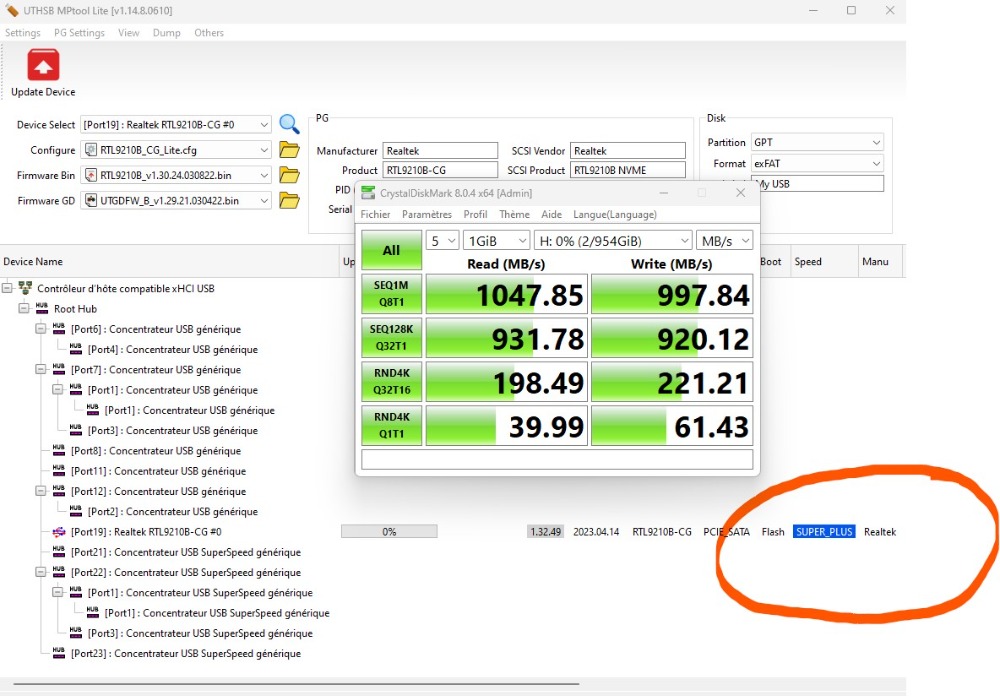
Hi JJ I think you are not on a USB 3.2 X1 port (10Gbps) check with the utility it displays as below
Asus Z890 ProArt, Intel Cpu Core Ultra 7 265K, Memoires 32Go Corsair DDR5 (6000Mhz CL30), Water-cooling Thermaright, nVidia Geforce RTX4060, Alimentation Gigabyte 850W, Samsung SSD 990 Pro, SSD9100 Pro, Steelserie Pro , Souris Razer, Boitier HUMMER, HP Steelserie, Free Fibre Ultra (8Go/8Go), Lan 10Gb, Cable CAT8/7, Switch 10/5/2.5Gbps, Casque Philips Fedelis.
Last edit: 3 years 3 months ago by admin.
The following user(s) said Thank You: jj
Please Connexion or Create an account to join the conversation.
- jj
-

- Offline
- Newbie
-

Enregistré
- Posts: 4
- Thanks: 0
Re: NVME USB drives Realtek RTL9210/RTL9220 Firmware Version 1.xx
3 years 3 months ago
Hi @spike_V_sky as I mentioned on the first line, issues were solved.
I had to flash the FW twice for it to work. Then I reconnected the enclosure, formatted the disk, and I guess I proceeded with my tests.
Then wrote this post after being really disappointed.
I disassembled the enclosure, removed SSD, put it together again and after connecting it, I managed to get 375 MB/s. Idk if others reach higher speeds than me, but for me this is more than enough.
Thank you for taking your time to answer!
I had to flash the FW twice for it to work. Then I reconnected the enclosure, formatted the disk, and I guess I proceeded with my tests.
Then wrote this post after being really disappointed.
I disassembled the enclosure, removed SSD, put it together again and after connecting it, I managed to get 375 MB/s. Idk if others reach higher speeds than me, but for me this is more than enough.
Thank you for taking your time to answer!
Please Connexion or Create an account to join the conversation.
- jj
-
- Offline
- Newbie
-
Enregistré
- Posts: 4
- Thanks: 0
Re: NVME USB drives Realtek RTL9210/RTL9220 Firmware Version 1.xx
3 years 3 months ago
Hi @admin,
yes, it only says SUPER.
According to MSI's specs, my Type C port is: USB3.2 Gen1
If I got it correctly, it should only support 5gbps, right?
Isn't 375 MB/s fast enough?
Please know that my laptop's SSDs might be throttling my newer external SSD.
Thank you for taking your time
yes, it only says SUPER.
According to MSI's specs, my Type C port is: USB3.2 Gen1
If I got it correctly, it should only support 5gbps, right?
Isn't 375 MB/s fast enough?
Please know that my laptop's SSDs might be throttling my newer external SSD.
Thank you for taking your time
Please Connexion or Create an account to join the conversation.
- admin
-
Topic Author
- Away
- Admin
-
Administrateur
- Fdrsoft (Admin)
- Posts: 682
- Thanks: 441
Re: NVME USB drives Realtek RTL9210/RTL9220 Firmware Version 1.xx
3 years 3 months ago
Yes
 if your port and in 5Gbps it will be 500Mbps you will only have this speed, from 10Gbps you can reach 1gbps, 20Gbps = 2Gbps approx, ......
Asus Z890 ProArt, Intel Cpu Core Ultra 7 265K, Memoires 32Go Corsair DDR5 (6000Mhz CL30), Water-cooling Thermaright, nVidia Geforce RTX4060, Alimentation Gigabyte 850W, Samsung SSD 990 Pro, SSD9100 Pro, Steelserie Pro , Souris Razer, Boitier HUMMER, HP Steelserie, Free Fibre Ultra (8Go/8Go), Lan 10Gb, Cable CAT8/7, Switch 10/5/2.5Gbps, Casque Philips Fedelis.
Please Connexion or Create an account to join the conversation.
- jj
-
- Offline
- Newbie
-
Enregistré
- Posts: 4
- Thanks: 0
Re: NVME USB drives Realtek RTL9210/RTL9220 Firmware Version 1.xx
3 years 3 months ago
Hi @wade7575, @all
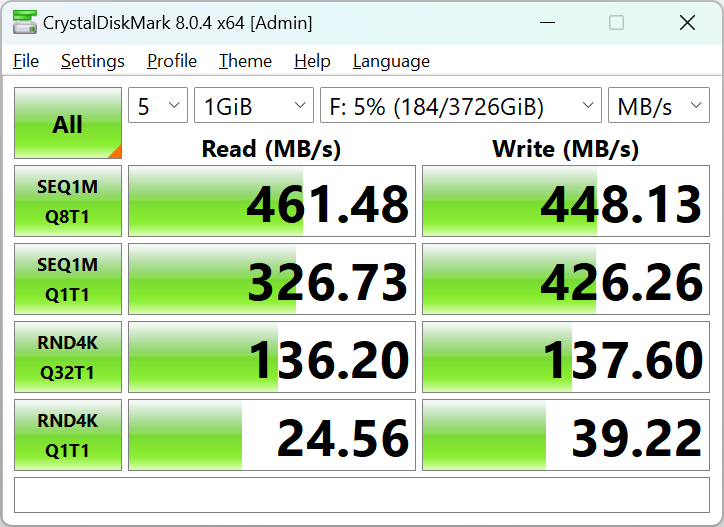
I think I will not get much of a difference by changing FW versions. I got the latest version installed already, and as I mentioned, I got real work copy speed of 375 MB/s over a 12 GB file.
And I also have a USB 3.2 Gen 1 port.
See also Crystal Mark below.
Thank you very much for your time
I think I will not get much of a difference by changing FW versions. I got the latest version installed already, and as I mentioned, I got real work copy speed of 375 MB/s over a 12 GB file.
And I also have a USB 3.2 Gen 1 port.
See also Crystal Mark below.
Thank you very much for your time
Please Connexion or Create an account to join the conversation.
Time to create page: 0.082 seconds