



NVME USB drives Realtek RTL9210/RTL9220 Firmware Version 1.xx
- cyberops
-

- Hors Ligne
- Poster 2
-

Enregistré
- Messages : 5
- Thanks: 0
Re: NVME USB drives Realtek RTL9210/RTL9220 Firmware Version 1.xx
il y a 3 ans 3 mois - il y a 3 ans 3 moisi used the default config file that was in the app (used all the default, ill post a printscreen soon). where can i find the correct config or how can i tell that im using the correct one?@cyberops
Have you used the correct config file from your enclouser when you flashed the new firmware ?
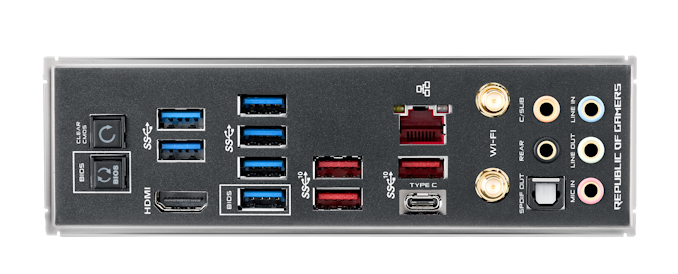
Have you checked if the usb port where the enclouser is connect is 3.1 or 2.0 ?
i used an usb 3.0 (blue one in the photo) port but i didnt use the supplied cable, probably this was the problem. should i use a 3.1 usb port (red usb port)?
thank you for your help
Dernière édition: il y a 3 ans 3 mois par cyberops.
Connexion ou Créer un compte pour participer à la conversation.
- admin
-
 Auteur du sujet
- Hors Ligne
- Admin
-

Administrateur
- Fdrsoft (Admin)
- Messages : 672
- Thanks: 422
Re: NVME USB drives Realtek RTL9210/RTL9220 Firmware Version 1.xx
il y a 3 ans 3 mois - il y a 3 ans 3 mois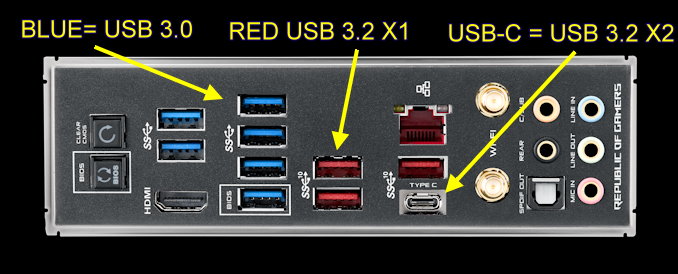
Instead, use the USB-C port in USB 3.2 X2 (20Gbps) to have the best speed (I also use USB-C with a 1M cable) otherwise the blue port is normally sufficient for 10Gbps

Asus Z890 ProArt, Intel Cpu Core Ultra 7 265K, Memoires 32Go Corsair DDR5 (6000Mhz CL30), Water-cooling Thermaright, nVidia Geforce RTX4060, Alimentation Gigabyte 850W, Samsung SSD 990 Pro, SSD9100 Pro, Steelserie Pro , Souris Razer, Boitier HUMMER, HP Steelserie, Free Fibre Ultra (8Go/8Go), Lan 10Gb, Cable CAT8/7, Switch 10/5/2.5Gbps, Casque Philips Fedelis.
Dernière édition: il y a 3 ans 3 mois par admin.
Les utilisateur(s) suivant ont remercié: cyberops
Connexion ou Créer un compte pour participer à la conversation.
- cyberops
-
- Hors Ligne
- Poster 2
-
Enregistré
- Messages : 5
- Thanks: 0
Re: NVME USB drives Realtek RTL9210/RTL9220 Firmware Version 1.xx
il y a 3 ans 3 mois
Instead, use the USB-C port in USB 3.2 X2 (20Gbps) to have the best speed (I also use USB-C with a 1M cable) otherwise the blue port is normally sufficient for 10Gbps
thank you for explanation
 and regarding firmware update? i used this settings:
Connexion ou Créer un compte pour participer à la conversation.
- cyberops
-
- Hors Ligne
- Poster 2
-
Enregistré
- Messages : 5
- Thanks: 0
Re: NVME USB drives Realtek RTL9210/RTL9220 Firmware Version 1.xx
il y a 3 ans 3 mois - il y a 3 ans 3 mois
Instead, use the USB-C port in USB 3.2 X2 (20Gbps) to have the best speed (I also use USB-C with a 1M cable) otherwise the blue port is normally sufficient for 10Gbps
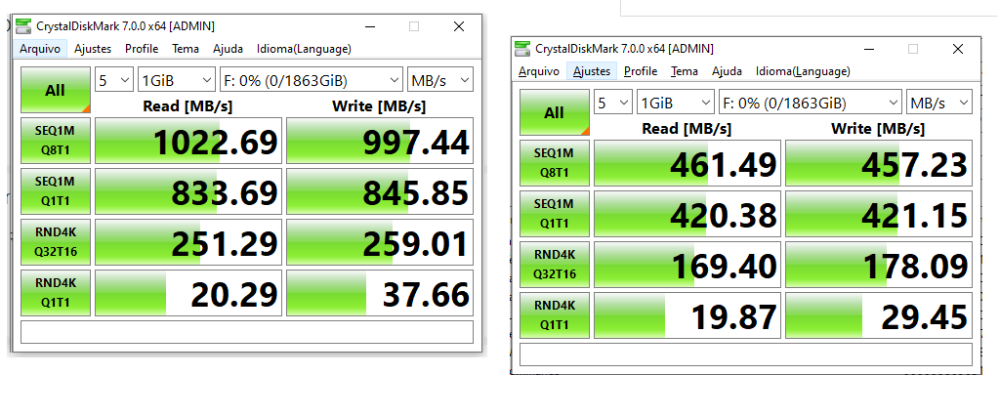
it seems that the cable i was using was not the best one. the left image is using usb-c provided cable, right image is using usb in a usb 3.0.
I still have problems (i think it powers down) with the device while working. does someone have any idea why? this happens in a old barebone with usb 2.0. is this because of not enough power?
just found this:
github.com/raspberrypi/linux/issues/4130
Dernière édition: il y a 3 ans 3 mois par cyberops.
Connexion ou Créer un compte pour participer à la conversation.
- Galixte
-

- Hors Ligne
- poster 3
-

Enregistré
- Messages : 13
- Thanks: 6
Re: NVME USB drives Realtek RTL9210/RTL9220 Firmware Version 1.xx
il y a 3 ans 3 mois - il y a 3 ans 3 mois
This Github issue is for RTL9210 revision A. Revision B is not affected by this issue.
So, which USB enclosure chipset do you use? RTL9210 or RTL9210B?
EDIT: my bad: github.com/raspberrypi/linux/issues/4130...uecomment-1272172747
So, which USB enclosure chipset do you use? RTL9210 or RTL9210B?
EDIT: my bad: github.com/raspberrypi/linux/issues/4130...uecomment-1272172747
🖥️📜⚙️
Mes babioles (hardware config)
.
Dernière édition: il y a 3 ans 3 mois par Galixte.
Connexion ou Créer un compte pour participer à la conversation.
Temps de génération de la page : 0.088 secondes