



Kowsi KWS-X1 USB-C PD QC Tester Firmware V1.0.5V
- sdefrwggerg
-
 Topic Author
- Offline
- Big Poster
-

Enregistré
- Posts: 45
- Thanks: 24
Kowsi KWS-X1 USB-C PD QC Tester Firmware V1.0.5V
1 year 2 months ago - 1 week 5 days ago
USB-C Multi-function full protocol, curve measurement, ripple measurement, E-Marker tester
Fully compatible with fast charging protocol and Qualcomm QC 3.0 / 4.0 protocol, compatible with a variety of protocols fast charging, support PD/QC2.0/3.0/4.0, MTK and other protocols. Support automatic protocol detection, PD2.0, 3.0, PPS, QC, FCP, SCP, AFC, PE, DASH VOOC, SuperVooc and so on.
Update
1. Press and hold back and OK and plug in the USB-C cable in female USB-C Port, Bootloader will appear on Display.
2. Start the program.
3. Perform Firmware update!
V1.0.1 - Standard Firmware
V1.0.2 - Performance improvements, fixes for some bugs related to Public-PD
V1.0.3 - E-Marker, keep reset when Public-PD detection on, Translation
V1.0.4 - Bugfixes ,Translation and new E-Marker Menu, Support to read E-Marker on Cable
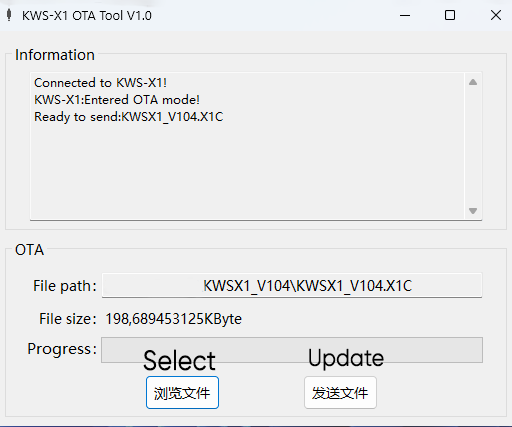
Download !
Fully compatible with fast charging protocol and Qualcomm QC 3.0 / 4.0 protocol, compatible with a variety of protocols fast charging, support PD/QC2.0/3.0/4.0, MTK and other protocols. Support automatic protocol detection, PD2.0, 3.0, PPS, QC, FCP, SCP, AFC, PE, DASH VOOC, SuperVooc and so on.
Update
1. Press and hold back and OK and plug in the USB-C cable in female USB-C Port, Bootloader will appear on Display.
2. Start the program.
3. Perform Firmware update!
V1.0.1 - Standard Firmware
V1.0.2 - Performance improvements, fixes for some bugs related to Public-PD
V1.0.3 - E-Marker, keep reset when Public-PD detection on, Translation
V1.0.4 - Bugfixes ,Translation and new E-Marker Menu, Support to read E-Marker on Cable
Download !
Last edit: 1 week 5 days ago by sdefrwggerg.
The following user(s) said Thank You: grimson, mountainmanjoe
Please Log in or Create an account to join the conversation.
- mountainmanjoe
-

- Offline
- Newbie
-

Enregistré
- Posts: 1
- Thanks: 0
Re: Kowsi KWS-X1 USB-C PD QC Tester Firmware V1.0.4
4 months 2 weeks ago - 4 months 2 weeks ago
I received my KWS-X1 from Aliexpress today (seller: ThinkingLeader, 17 CAD).
It came with firware version 1.0.5
It's a bit buggy. (resets itself often)
It came with firware version 1.0.5
It's a bit buggy. (resets itself often)
Last edit: 4 months 2 weeks ago by mountainmanjoe.
Please Log in or Create an account to join the conversation.
- sdefrwggerg
-
Topic Author
- Offline
- Big Poster
-
Enregistré
- Posts: 45
- Thanks: 24
Re: Kowsi KWS-X1 USB-C PD QC Tester Firmware V1.0.4
1 week 5 days ago
Upgrading the firmware to v1.0.5V solved the problem!
V1.0.5
- Enhanced PPS Support (20mV voltage steps, max 21V, current accuracy ±0.8%)
- Faster and More Stable Negotiation
- Improved PDO interpretation
- Enhanced measurement accuracy (ADC 5kHz, improved transient capture)
- Improved usability (1.8-second startup, automatic backlight dimming)
- Bug fixes (memory leaks, display errors, calibration retention)
- Added factory reset
drive.google.com/file/d/1SuGoDPUbEZWjM3SW5MWWBm0r6pa91i0m/view
V1.0.5
- Enhanced PPS Support (20mV voltage steps, max 21V, current accuracy ±0.8%)
- Faster and More Stable Negotiation
- Improved PDO interpretation
- Enhanced measurement accuracy (ADC 5kHz, improved transient capture)
- Improved usability (1.8-second startup, automatic backlight dimming)
- Bug fixes (memory leaks, display errors, calibration retention)
- Added factory reset
drive.google.com/file/d/1SuGoDPUbEZWjM3SW5MWWBm0r6pa91i0m/view
Please Log in or Create an account to join the conversation.
- grimson
-
- Offline
- Newbie
-
Enregistré
- Posts: 4
- Thanks: 2
Re: Kowsi KWS-X1 USB-C PD QC Tester Firmware V1.0.5V
1 week 1 day ago
Owners of this USB tester could be interested in some interesting custom firmware development.
www.reddit.com/r/UsbCHardware/comments/1...a_cheap_usb_c_meter/
github.com/kralonur/kws-x1-standalone-rs/releases/
I flashed my copy and it suprisingly works well.
www.reddit.com/r/UsbCHardware/comments/1...a_cheap_usb_c_meter/
github.com/kralonur/kws-x1-standalone-rs/releases/
I flashed my copy and it suprisingly works well.
The following user(s) said Thank You: sdefrwggerg
Please Log in or Create an account to join the conversation.
- sdefrwggerg
-
Topic Author
- Offline
- Big Poster
-
Enregistré
- Posts: 45
- Thanks: 24
Re: Kowsi KWS-X1 USB-C PD QC Tester Firmware V1.0.5V
7 hours 4 minutes ago
Wow nice thx
[/left][/code]I write a Batch Script for Safe Firmware Flashing (Unofficial)This batch script automates the firmware flashing process for the KWS-X1 meter while adding manual verification steps to protect against corrupted or tampered firmware files.What It Does
Code:
[left][code][color=#4078f2]@[/color][color=#a626a4]echo[/color] off [color=#a626a4]setlocal[/color] enabledelayedexpansion [color=#a626a4]cd[/color] [color=#b76b01]/d[/color] [color=#50a14f]"%~dp0"[/color] [color=#a626a4]set[/color] [color=#50a14f]"IMAGE=firmware.X1C"[/color] [color=#a626a4]set[/color] [color=#50a14f]"FLASHER=flasher.exe"[/color] [color=#a626a4]echo[/color] ============================================================ [color=#a626a4]echo[/color] Rust Firmware-Flasher - [color=#4078f2]%IMAGE%[/color] [color=#a626a4]echo[/color] ============================================================ [color=#a626a4]echo[/color] Disclaimer. This is unofficial firmware, provided as is, without warranty of any kind. [color=#a626a4]echo[/color] Flashing it, and using the meter with it, is entirely at your own risk. The author [color=#a626a4]echo[/color] is not responsible for any damage to the meter, to chargers, cables or connected [color=#a626a4]echo[/color] devices, or for any other loss. Sink mode can put up to the charger's highest [color=#a626a4]echo[/color] voltage on the meter's output. [color=#a626a4]echo[/color]. [color=#a626a4]if[/color] [color=#a626a4]not[/color] [color=#a626a4]exist[/color] [color=#50a14f]"%FLASHER%"[/color] [color=#383a42]([/color] [color=#a626a4]echo[/color] ERROR: [color=#4078f2]%FLASHER%[/color] not found. [color=#a626a4]echo[/color] Folder: [color=#4078f2]%CD%[/color] [color=#a626a4]goto[/color] [color=#e45649]:abort[/color] [color=#383a42])[/color] [color=#a626a4]if[/color] [color=#a626a4]not[/color] [color=#a626a4]exist[/color] [color=#50a14f]"%IMAGE%"[/color] [color=#383a42]([/color] [color=#a626a4]echo[/color] ERROR: [color=#4078f2]%IMAGE%[/color] not found. [color=#a626a4]echo[/color] Folder: [color=#4078f2]%CD%[/color] [color=#a626a4]goto[/color] [color=#e45649]:abort[/color] [color=#383a42])[/color] [color=#a626a4]echo[/color] [[color=#b76b01]1[/color]/[color=#b76b01]4[/color]] Computing SHA[color=#b76b01]-256[/color] of the firmware and confirming it [color=#a626a4]set[/color] [color=#50a14f]"HASH="[/color] [color=#a626a4]for[/color] [color=#b76b01]/f[/color] [color=#50a14f]"usebackq delims="[/color] [color=#4078f2]%%a[/color] in (`powershell -NoProfile -Command [color=#50a14f]"(Get-FileHash -LiteralPath '%IMAGE%' -Algorithm SHA256).Hash.ToLower()"[/color]`[color=#383a42])[/color] do set "HASH=%%a" [color=#a626a4]if[/color] [color=#a626a4]not[/color] [color=#a626a4]defined[/color] HASH [color=#383a42]([/color] [color=#a626a4]echo[/color] ERROR: Could not compute the hash. [color=#a626a4]goto[/color] [color=#e45649]:abort[/color] [color=#383a42])[/color] [color=#a626a4]set[/color] [color=#50a14f]"TAIL=!HASH:~63,1!"[/color] [color=#a626a4]if[/color] [color=#50a14f]"!TAIL!"[/color][color=#4078f2]==[/color][color=#50a14f]""[/color] [color=#a626a4]echo[/color] WARNING: Value does not have the expected length of [color=#b76b01]64[/color] characters. [color=#a626a4]echo[/color] Local firmware hash : [color=#4078f2]!HASH![/color] [color=#a626a4]echo[/color] Now compare this value yourself against the independently confirmed hash [color=#a626a4]echo[/color] - release page, signature, or a second machine. [color=#a626a4]echo[/color]. [color=#a626a4]set[/color] [color=#b76b01]/p[/color] "[color=#4078f2]CONFIRM[/color][color=#4078f2]=[/color]Does the hash match? [color=#383a42]([/color]y[color=#b76b01]/n[/color][color=#383a42])[/color]: " [color=#a626a4]if[/color] [color=#b76b01]/i[/color] [color=#a626a4]not[/color] [color=#50a14f]"!CONFIRM!"[/color][color=#4078f2]==[/color][color=#50a14f]"y"[/color] [color=#383a42]([/color] [color=#a626a4]echo[/color]. [color=#a626a4]echo[/color] ERROR: Hash not confirmed - no flashing. [color=#a626a4]echo[/color] Get the firmware again from https://github.com/kralonur/kws-x1-standalone-rs[color=#b76b01]/releases[/color] [color=#a626a4]goto[/color] [color=#e45649]:abort[/color] [color=#383a42])[/color] [color=#a626a4]echo[/color] OK - hash confirmed as correct. [color=#a626a4]echo[/color]. [color=#a626a4]echo[/color] [[color=#b76b01]2[/color]/[color=#b76b01]4[/color]] Offline validation - dry run, no device access "%FLASHER%" --dry-run --image "%IMAGE%" --confirm-sha256 "!HASH!" [color=#a626a4]if[/color] [color=#a626a4]errorlevel[/color] [color=#b76b01]1[/color] [color=#383a42]([/color] [color=#a626a4]echo[/color]. [color=#a626a4]echo[/color] ERROR: Validation failed. Aborting. [color=#a626a4]goto[/color] [color=#e45649]:abort[/color] [color=#383a42])[/color] [color=#a626a4]echo[/color] Validation successful. [color=#a626a4]echo[/color]. [color=#a626a4]echo[/color] [[color=#b76b01]3[/color]/[color=#b76b01]4[/color]] Put the device into bootloader mode [color=#a626a4]echo[/color] - Unplug the meter from USB [color=#a626a4]echo[/color] - Hold BACK and OK pressed at the same time [color=#a626a4]echo[/color] - Plug the meter in while holding them [color=#a626a4]echo[/color] - Do NOT connect an output load [color=#a626a4]echo[/color]. [color=#a626a4]pause[/color] [color=#a626a4]echo[/color] Optional mode check - mode [color=#b76b01]0[/color] means bootloader: "%FLASHER%" --info [color=#a626a4]echo[/color]. [color=#a626a4]echo[/color] [[color=#b76b01]4[/color]/[color=#b76b01]4[/color]] Writing the firmware [color=#a626a4]echo[/color] CAUTION: This writes to the device. [color=#a626a4]set[/color] [color=#b76b01]/p[/color] "[color=#4078f2]GO[/color][color=#4078f2]=[/color]Flash now? [color=#383a42]([/color]y[color=#b76b01]/n[/color][color=#383a42])[/color]: " [color=#a626a4]if[/color] [color=#b76b01]/i[/color] [color=#a626a4]not[/color] [color=#50a14f]"!GO!"[/color][color=#4078f2]==[/color][color=#50a14f]"y"[/color] [color=#383a42]([/color] [color=#a626a4]echo[/color] Cancelled. Nothing was written. [color=#a626a4]goto[/color] [color=#e45649]:end[/color] [color=#383a42])[/color] [color=#a626a4]echo[/color]. "%FLASHER%" --image "%IMAGE%" --confirm-sha256 "!HASH!" [color=#a626a4]if[/color] [color=#a626a4]errorlevel[/color] [color=#b76b01]1[/color] [color=#383a42]([/color] [color=#a626a4]echo[/color]. [color=#a626a4]echo[/color] ERROR while writing or verifying. [color=#a626a4]echo[/color] Leave the device in bootloader mode and investigate the cause. [color=#a626a4]goto[/color] [color=#e45649]:abort[/color] [color=#383a42])[/color] [color=#a626a4]echo[/color]. [color=#a626a4]echo[/color] Leave the device connected. The backlight flashes briefly with a blank display, [color=#a626a4]echo[/color] then the meter restarts and the process is complete. [color=#a626a4]goto[/color] [color=#e45649]:end[/color] [color=#e45649]:abort[/color] [color=#a626a4]echo[/color]. [color=#a626a4]echo[/color] Process aborted. [color=#e45649]:end[/color] [color=#a626a4]echo[/color]. [color=#a626a4]pause[/color] [color=#a626a4]endlocal[/color]
- Computes SHA-256 hash – Calculates the checksum of your local
file using PowerShell.Code:firmware.X1C
- Manual hash confirmation – Displays the computed hash and asks you to confirm it matches the official release hash. This prevents accidental flashing of corrupted or modified files.
- Dry-run validation – Runs the flasher in offline mode to verify the firmware and flasher setup work before touching the device.
- Bootloader instructions – Provides step-by-step guidance to enter the meter's bootloader mode (BACK + OK while connecting USB).
- Final write operation – Only proceeds to flash the firmware after all previous checks pass and you explicitly confirm.
- Checks that both
andCode:flasher.exeexist before proceeding.Code:firmware.X1C
- Validates hash length (64 characters for SHA-256).
- Requires explicit user confirmation at multiple checkpoints.
- Does not write to the device until dry-run validation succeeds.
- Leaves the device in bootloader mode on error for troubleshooting.
- Windows (uses
andCode:cmd.exe)Code:powershell.exe
-
in the same folderCode:flasher.exe
-
in the same folderCode:firmware.X1C
- Compare the displayed hash against the official release hash manually
Please Log in or Create an account to join the conversation.
Time to create page: 0.093 seconds