



NVME USB drives Realtek RTL9210/RTL9220 Firmware Version 1.xx
- admin
-
 Topic Author
- Away
- Admin
-

Administrateur
- Fdrsoft (Admin)
- Posts: 682
- Thanks: 445
Re: NVME USB drives Realtek RTL9210/RTL9220 Firmware Version 1.xx
2 years 6 days ago
yes this is normally safe because we can return to the original firmware if there is a problem see the topic below
www.station-drivers.com/index.php/en/les...losures-usb-3-2-nvme
www.station-drivers.com/index.php/en/les...losures-usb-3-2-nvme
Asus Z890 ProArt, Intel Cpu Core Ultra 7 265K, Memoires 32Go Corsair DDR5 (6000Mhz CL30), Water-cooling Thermaright, nVidia Geforce RTX4060, Alimentation Gigabyte 850W, Samsung SSD 990 Pro, SSD9100 Pro, Steelserie Pro , Souris Razer, Boitier HUMMER, HP Steelserie, Free Fibre Ultra (8Go/8Go), Lan 10Gb, Cable CAT8/7, Switch 10/5/2.5Gbps, Casque Philips Fedelis.
Please Log in or Create an account to join the conversation.
- AOnurY
-

- User
-

Public
- Thanks: 0
Re: NVME USB drives Realtek RTL9210/RTL9220 Firmware Version 1.xx
1 year 11 months ago
Hello,
I updated the firmware of my external drive using the Ugreen CM400 model RTL9210B-CG chipset. It is currently installed with version 1.33.7. I think I am currently experiencing a problem because I did not pay attention to some settings. Before the update, under Disk Drives in Device Manager, the name of the disk installed in the drive was shown as "SanDisk Extreme Pro 1TB USB Device". But now it is shown as "Realtek RTL9210B-CG USB Device". How can I revert it back to its previous state? Also, I am confused whether the latest version is 1.33.44 or 1.33.7
I updated the firmware of my external drive using the Ugreen CM400 model RTL9210B-CG chipset. It is currently installed with version 1.33.7. I think I am currently experiencing a problem because I did not pay attention to some settings. Before the update, under Disk Drives in Device Manager, the name of the disk installed in the drive was shown as "SanDisk Extreme Pro 1TB USB Device". But now it is shown as "Realtek RTL9210B-CG USB Device". How can I revert it back to its previous state? Also, I am confused whether the latest version is 1.33.44 or 1.33.7
Please Log in or Create an account to join the conversation.
- admin
-
Topic Author
- Away
- Admin
-
Administrateur
- Fdrsoft (Admin)
- Posts: 682
- Thanks: 445
Re: NVME USB drives Realtek RTL9210/RTL9220 Firmware Version 1.xx
1 year 11 months ago - 1 year 11 months ago
Hi,
You need to edit the configuration file and change the name of the disk description header
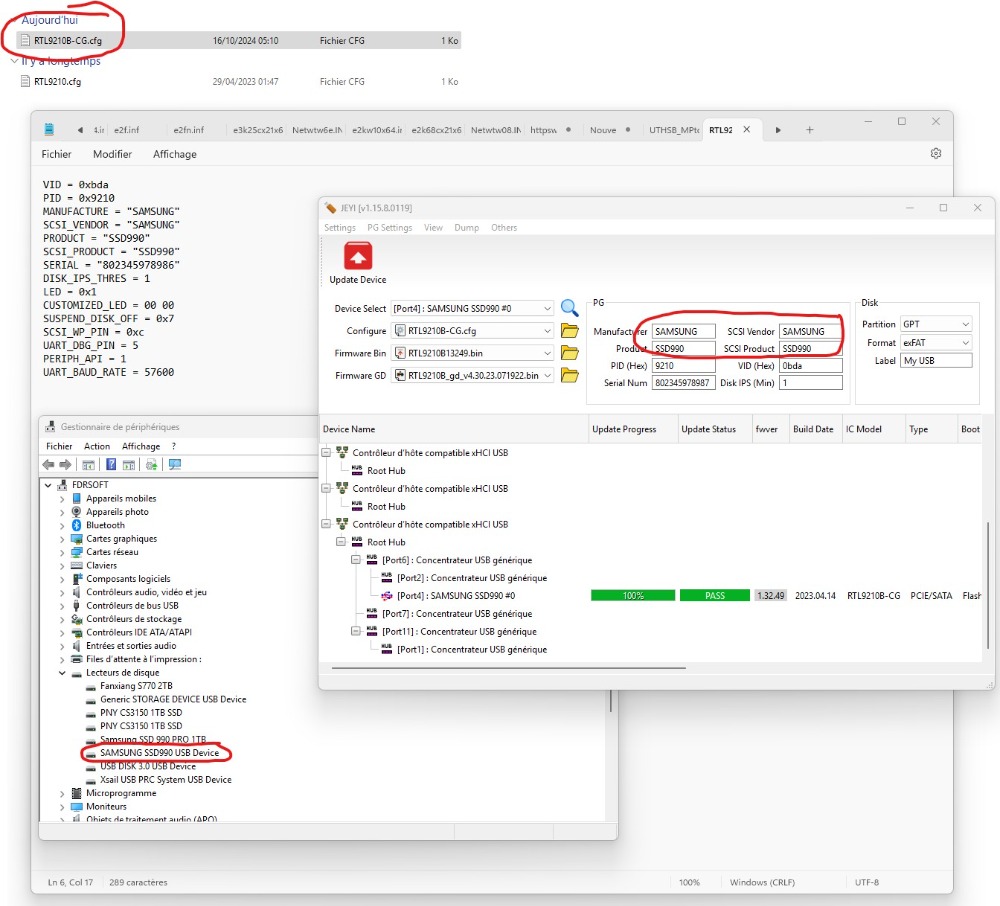
You need to edit the configuration file and change the name of the disk description header
Asus Z890 ProArt, Intel Cpu Core Ultra 7 265K, Memoires 32Go Corsair DDR5 (6000Mhz CL30), Water-cooling Thermaright, nVidia Geforce RTX4060, Alimentation Gigabyte 850W, Samsung SSD 990 Pro, SSD9100 Pro, Steelserie Pro , Souris Razer, Boitier HUMMER, HP Steelserie, Free Fibre Ultra (8Go/8Go), Lan 10Gb, Cable CAT8/7, Switch 10/5/2.5Gbps, Casque Philips Fedelis.
Last edit: 1 year 11 months ago by admin.
The following user(s) said Thank You: AOnurY
Please Log in or Create an account to join the conversation.
- AOnurY
-
- User
-
Public
- Thanks: 0
Re: NVME USB drives Realtek RTL9210/RTL9220 Firmware Version 1.xx
1 year 11 months ago - 1 year 10 months ago
Thank you very much. I did as you said and it worked.
Update: I thought the problem was fixed, but it was just a masking. The "SanDisk Extreme Pro 1TB" data that I wrote in the PG section is permanent. When I plug another Nvme Disk (Knoxia brand) into the enclosure, "SanDisk Extreme Pro 1TB" continues to appear permanently in Device Manager Disk Drives. I remember writing down the brand and model of the disk that was plugged in before doing any updates. Please correct me if I'm wrong.
New update: When I deleted the "SCSI_PRODUCT =" and "SCSI_VENDOR" lines from the CFG file, the problem was solved.
Update: I thought the problem was fixed, but it was just a masking. The "SanDisk Extreme Pro 1TB" data that I wrote in the PG section is permanent. When I plug another Nvme Disk (Knoxia brand) into the enclosure, "SanDisk Extreme Pro 1TB" continues to appear permanently in Device Manager Disk Drives. I remember writing down the brand and model of the disk that was plugged in before doing any updates. Please correct me if I'm wrong.
New update: When I deleted the "SCSI_PRODUCT =" and "SCSI_VENDOR" lines from the CFG file, the problem was solved.
Last edit: 1 year 10 months ago by AOnurY.
Please Log in or Create an account to join the conversation.
- pt83
-
- Offline
- Poster 2
-

Enregistré
- Posts: 7
- Thanks: 0
Re: NVME USB drives Realtek RTL9210/RTL9220 Firmware Version 1.xx
1 year 11 months ago - 1 year 11 months ago
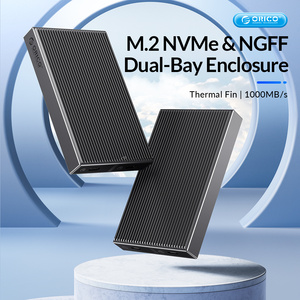
Hello, I presently got a ORICO BM2C3-2N double bay SSD m2 box that is using RTL9210 chipset. Please help me find the dump so I can upgrade the firmware. The current one is not possible to plug both bay at the same time because no identical ID.
I already downloaded flashing software from [url] github.com/bensuperpc/rtl9210-firmware [/url]
Product link: [url] www.orico.cc/usmobile/product/detail/id/7824 [/url]
I already downloaded flashing software from [url] github.com/bensuperpc/rtl9210-firmware [/url]
Product link: [url] www.orico.cc/usmobile/product/detail/id/7824 [/url]
Last edit: 1 year 11 months ago by pt83.
Please Log in or Create an account to join the conversation.
Time to create page: 0.079 seconds