



Universal Intel Chipset Drivers Updater
- FirstEver
-
 Topic Author
- Offline
- The Best Poster
-

Enregistré
- 帖子: 118
- Thanks: 204
Re: Universal Intel Chipset Drivers Updater
2 个月 6 天 � - 2 个月 6 天 �
@rvail
- thanks for including the log.
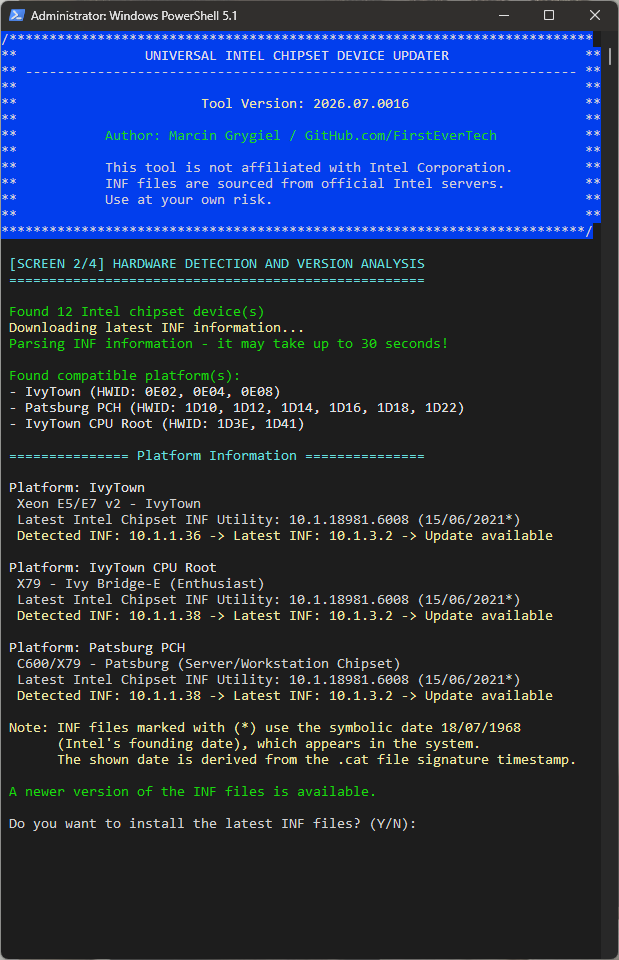
It turns out my updater was using an older detection method for chipset devices, based on filtering device FriendlyName strings against a keyword list — and in this case it silently skipped devices whose FriendlyName didn't contain any of those keywords. That's exactly what happened with your three devices.
That said, in this specific case it didn't actually matter. All of the relevant devices — the ones my updater detected and the three it missed — point to the same Intel installer package (10.1.20551.8850). So even detecting just one of them would have been enough: my updater's job is only to detect the installed hardware, identify the latest matching INF versions, and download the correct official Intel installer package. It doesn't handle the actual file installation itself — that final step is fully handled by Intel's own SetupChipset.exe, which does its own hardware matching and decides independently what to install and for which devices.
So if all the latest INF files for your system were bundled inside that one Intel installer, they should have all been installed once it ran — that part is outside my updater's control. That's actually the one thing I still can't explain: why that apparently didn't happen in your case.
As for my updater — in the next version I'll be replacing the FriendlyName-based detection with direct HWID-based matching against my full INF/HWID database, so detection no longer depends on guessing which words might appear in a device's display name. Since I already have the complete list of every known Intel chipset INF file and its associated HWIDs, there's no need to infer device categories from partial name-string matching anymore — every device gets matched by its actual hardware ID.
UPDATE
Old FriendlyName-based detection
New Full INF/HWID database detection
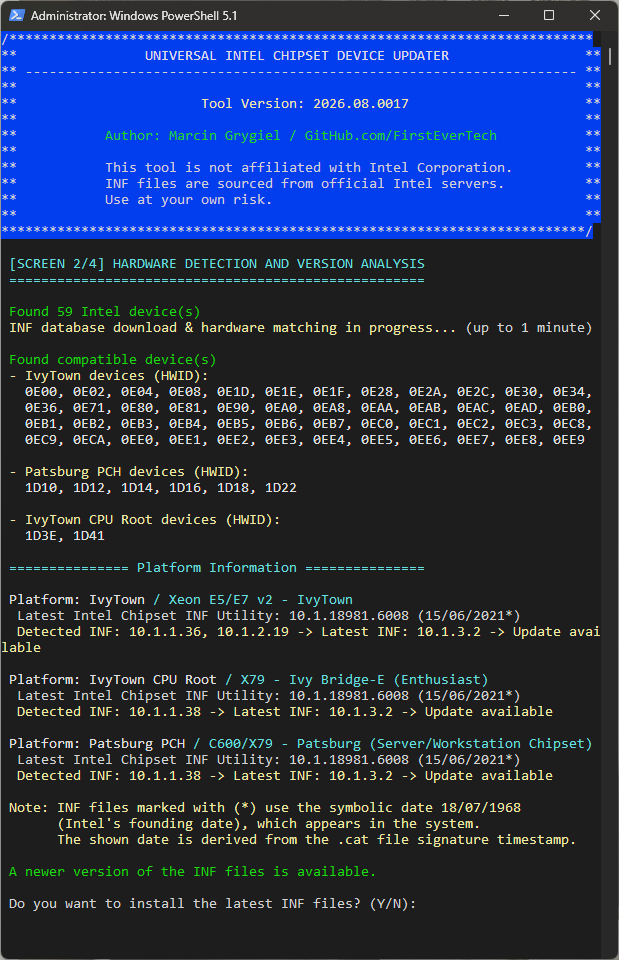
There is now full detection of all active Intel chipset devices—though the fact remains that the updater will ultimately install the same version of the Intel Chipset Device Software.
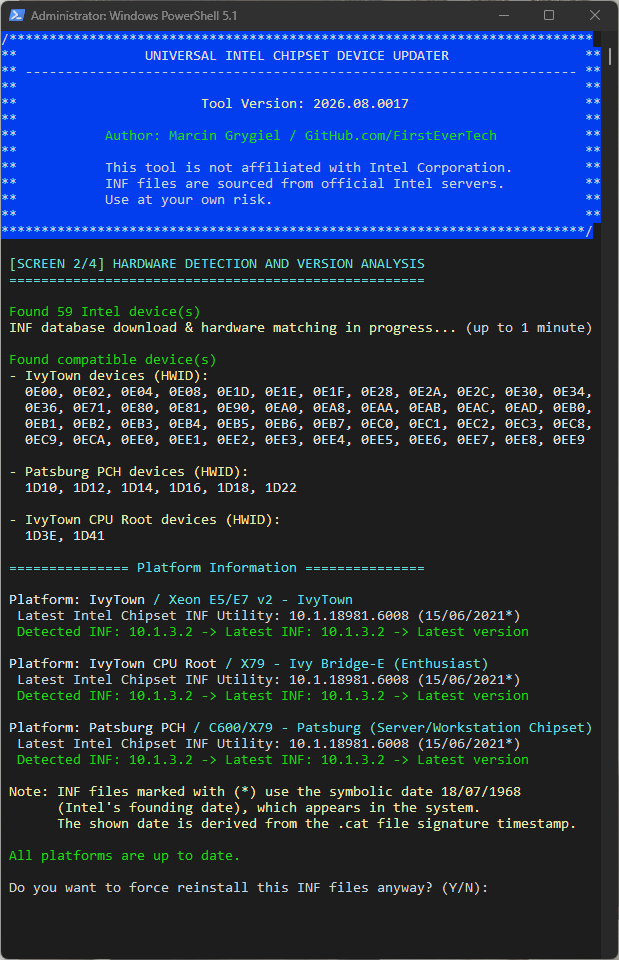
Everything is up to date after installation...
It turns out my updater was using an older detection method for chipset devices, based on filtering device FriendlyName strings against a keyword list — and in this case it silently skipped devices whose FriendlyName didn't contain any of those keywords. That's exactly what happened with your three devices.
That said, in this specific case it didn't actually matter. All of the relevant devices — the ones my updater detected and the three it missed — point to the same Intel installer package (10.1.20551.8850). So even detecting just one of them would have been enough: my updater's job is only to detect the installed hardware, identify the latest matching INF versions, and download the correct official Intel installer package. It doesn't handle the actual file installation itself — that final step is fully handled by Intel's own SetupChipset.exe, which does its own hardware matching and decides independently what to install and for which devices.
So if all the latest INF files for your system were bundled inside that one Intel installer, they should have all been installed once it ran — that part is outside my updater's control. That's actually the one thing I still can't explain: why that apparently didn't happen in your case.
As for my updater — in the next version I'll be replacing the FriendlyName-based detection with direct HWID-based matching against my full INF/HWID database, so detection no longer depends on guessing which words might appear in a device's display name. Since I already have the complete list of every known Intel chipset INF file and its associated HWIDs, there's no need to infer device categories from partial name-string matching anymore — every device gets matched by its actual hardware ID.
UPDATE
Old FriendlyName-based detection
New Full INF/HWID database detection
There is now full detection of all active Intel chipset devices—though the fact remains that the updater will ultimately install the same version of the Intel Chipset Device Software.
Everything is up to date after installation...
Last edit: 2 个月 6 天 � by FirstEver.
Please 登录 or 注册一个帐号 to join the conversation.
- rvail
-

- Offline
- regular poster
-

Enregistré
- 帖子: 36
- Thanks: 34
Re: Universal Intel Chipset Drivers Updater
2 个月 5 天 � - 2 个月 5 天 �
Ok, thanks. Did you decide on which software is more reasonable: your revised Intel Chipset detection software, vs. Driver Genius?
That is: opt to choose the version by latest file date, vs. choose by the latest driver version number?
Intel's logic in that regard seems to lack common sense.
That is: opt to choose the version by latest file date, vs. choose by the latest driver version number?
Intel's logic in that regard seems to lack common sense.
Last edit: 2 个月 5 天 � by rvail.
Please 登录 or 注册一个帐号 to join the conversation.
- FirstEver
-
Topic Author
- Offline
- The Best Poster
-
Enregistré
- 帖子: 118
- Thanks: 204
Re: Universal Intel Chipset Drivers Updater
2 个月 5 天 � - 2 个月 5 天 �
I've now spent a lot of hours in the weeds of Intel chipset INF files, and I think there's more context here than the original question captures. Let me break it down properly.
Q: Which software is more reasonable?
A: These are Intel devices, and Intel is the one writing the software for them — so whichever tool you use, what ultimately lands on your PC is an INF file authored by Intel. The question isn't really "which vendor's INF" (there's only one), it's "which tool gets you the correct one, correctly matched to your hardware."
Q: Choose by latest file date, vs. choose by latest driver version number?
A: This is both an easy and a hard question. If your hardware is still officially supported by Intel, the answer is simple: install the latest Intel Chipset Device Software package, and you'll automatically get the newest INF files for your platform — version number vs. date doesn't even come into play, because a current installer only ever ships current files.
It gets complicated with EOL hardware. Intel eventually removes INF files for retired platforms from newer Chipset Device Software packages, leaving end users with little indication of which package still supports their hardware. Worse, the official Intel installer may still report a successful installation even when the package doesn't contain a single INF matching the detected chipset. From the user's perspective, this is misleading: something gets installed, but nothing applicable to the chipset is actually installed, making the entire process effectively useless.
As for date vs. version specifically: the date field baked into these Intel INF files is essentially useless on its own. All of them carry a symbolic placeholder date — 18/07/1968, Intel's founding date — as the internal DriverVer date, regardless of when the file was actually built. If you want any real sense of when a given INF was actually produced, you have to pull it from the digital signature timestamp on the accompanying .cat file instead — the INF's own date field won't tell you anything. Version number, on the other hand, is always meaningful and always comparable. That's the one field you can actually trust.
Q: What does my Universal Intel Chipset Device Updater do well?
A: It maps all possible detected hardware to the latest available INF versions and identifies which official Intel installer package contains them. It then automatically downloads that installer and lets it handle the actual installation.
Q: What do tools like Driver Genius do?
A: They maintain a large driver database — but without the installers, just the raw INF+CAT files for things like Intel chipsets. Whether their matching logic is correct is something we can't actually verify, since that's not published information. If it works correctly, fine, use it — but I personally wouldn't pay for it, since better free alternatives exist.
Q: So what's actually the best option?
A: Right now I'd say Microsoft Update is the best distribution and matching mechanism overall. You get certainty of source, the drivers go through Microsoft's own certification labs, and installation is fast and clean without bundled installer bloat — though that's unfortunately starting to change, since Windows Update now sometimes pulls in bloated vendor software (RGB control utilities being a notorious example).
What's puzzling, though, is that Windows Update applies its own quality/priority classification to drivers, and it often doesn't install the highest available version — for example, it can pick an older INF for legacy Intel chipsets over a newer one that exists but isn't offered.
Q: Are there any legal restrictions around redistributing drivers?
A: Yes. Intel's software license generally prohibits copying or redistributing its software packages unless explicitly permitted by the license. That's why I don't redistribute Intel's chipset packages myself. If a third-party tool is hosting Intel's files on its own servers, whether that's permitted depends on the license under which those files were obtained—we can't determine that from the outside. If, on the other hand, the tool simply downloads the files directly from Microsoft's Windows Update infrastructure or another authorized public source, that's a different situation.
Q: Short recommendation?
A: For newer, still-supported hardware — don't install anything extra. Just make sure you've grabbed everything under Optional Updates in Windows Update. For EOL hardware (Intel chipsets specifically), I'd recommend my updater — it's free, requires no installation, doesn't hide what it's doing (anyone can read the source and see exactly how it detects and matches devices), and I also maintain a PowerShell Gallery version for IT admins. As an additional option for EOL hardware, downloading and archiving the last official Intel installer that ever supported your platform is also reasonable, since Intel will never update it again — I'm planning to add that as a built-in option in a future version.
Q: Is there an offline solution?
A: Right now, downloading Intel's installer only gets you support for currently-supported hardware, and redistributing those files myself wouldn't be legal, as mentioned above. That said, I'm working on a dedicated offline version of my updater that would pull the individual INF+CAT files for every Intel chipset generation going back to Sandy Bridge — similar in spirit to how UUP Dump works — sourcing everything from public Windows Update links and compiling a complete offline updater package directly on the user's machine. That's a future project, though, not something available yet.
Q: Which software is more reasonable?
A: These are Intel devices, and Intel is the one writing the software for them — so whichever tool you use, what ultimately lands on your PC is an INF file authored by Intel. The question isn't really "which vendor's INF" (there's only one), it's "which tool gets you the correct one, correctly matched to your hardware."
Q: Choose by latest file date, vs. choose by latest driver version number?
A: This is both an easy and a hard question. If your hardware is still officially supported by Intel, the answer is simple: install the latest Intel Chipset Device Software package, and you'll automatically get the newest INF files for your platform — version number vs. date doesn't even come into play, because a current installer only ever ships current files.
It gets complicated with EOL hardware. Intel eventually removes INF files for retired platforms from newer Chipset Device Software packages, leaving end users with little indication of which package still supports their hardware. Worse, the official Intel installer may still report a successful installation even when the package doesn't contain a single INF matching the detected chipset. From the user's perspective, this is misleading: something gets installed, but nothing applicable to the chipset is actually installed, making the entire process effectively useless.
As for date vs. version specifically: the date field baked into these Intel INF files is essentially useless on its own. All of them carry a symbolic placeholder date — 18/07/1968, Intel's founding date — as the internal DriverVer date, regardless of when the file was actually built. If you want any real sense of when a given INF was actually produced, you have to pull it from the digital signature timestamp on the accompanying .cat file instead — the INF's own date field won't tell you anything. Version number, on the other hand, is always meaningful and always comparable. That's the one field you can actually trust.
Q: What does my Universal Intel Chipset Device Updater do well?
A: It maps all possible detected hardware to the latest available INF versions and identifies which official Intel installer package contains them. It then automatically downloads that installer and lets it handle the actual installation.
Q: What do tools like Driver Genius do?
A: They maintain a large driver database — but without the installers, just the raw INF+CAT files for things like Intel chipsets. Whether their matching logic is correct is something we can't actually verify, since that's not published information. If it works correctly, fine, use it — but I personally wouldn't pay for it, since better free alternatives exist.
Q: So what's actually the best option?
A: Right now I'd say Microsoft Update is the best distribution and matching mechanism overall. You get certainty of source, the drivers go through Microsoft's own certification labs, and installation is fast and clean without bundled installer bloat — though that's unfortunately starting to change, since Windows Update now sometimes pulls in bloated vendor software (RGB control utilities being a notorious example).
What's puzzling, though, is that Windows Update applies its own quality/priority classification to drivers, and it often doesn't install the highest available version — for example, it can pick an older INF for legacy Intel chipsets over a newer one that exists but isn't offered.
Q: Are there any legal restrictions around redistributing drivers?
A: Yes. Intel's software license generally prohibits copying or redistributing its software packages unless explicitly permitted by the license. That's why I don't redistribute Intel's chipset packages myself. If a third-party tool is hosting Intel's files on its own servers, whether that's permitted depends on the license under which those files were obtained—we can't determine that from the outside. If, on the other hand, the tool simply downloads the files directly from Microsoft's Windows Update infrastructure or another authorized public source, that's a different situation.
Q: Short recommendation?
A: For newer, still-supported hardware — don't install anything extra. Just make sure you've grabbed everything under Optional Updates in Windows Update. For EOL hardware (Intel chipsets specifically), I'd recommend my updater — it's free, requires no installation, doesn't hide what it's doing (anyone can read the source and see exactly how it detects and matches devices), and I also maintain a PowerShell Gallery version for IT admins. As an additional option for EOL hardware, downloading and archiving the last official Intel installer that ever supported your platform is also reasonable, since Intel will never update it again — I'm planning to add that as a built-in option in a future version.
Q: Is there an offline solution?
A: Right now, downloading Intel's installer only gets you support for currently-supported hardware, and redistributing those files myself wouldn't be legal, as mentioned above. That said, I'm working on a dedicated offline version of my updater that would pull the individual INF+CAT files for every Intel chipset generation going back to Sandy Bridge — similar in spirit to how UUP Dump works — sourcing everything from public Windows Update links and compiling a complete offline updater package directly on the user's machine. That's a future project, though, not something available yet.
Last edit: 2 个月 5 天 � by FirstEver.
The following user(s) said Thank You: duttyend, fikotr74
Please 登录 or 注册一个帐号 to join the conversation.
- fikotr74
-

- Offline
- The Best Poster
-
Enregistré
- 帖子: 150
- Thanks: 106
- FirstEver
-
Topic Author
- Offline
- The Best Poster
-
Enregistré
- 帖子: 118
- Thanks: 204
Re: Universal Intel Chipset Drivers Updater
2 个月 4 天 � - 2 个月 4 天 �
Today I downloaded new drivers for AMD chipsets and I must admit that it is a pleasure to visit their site.
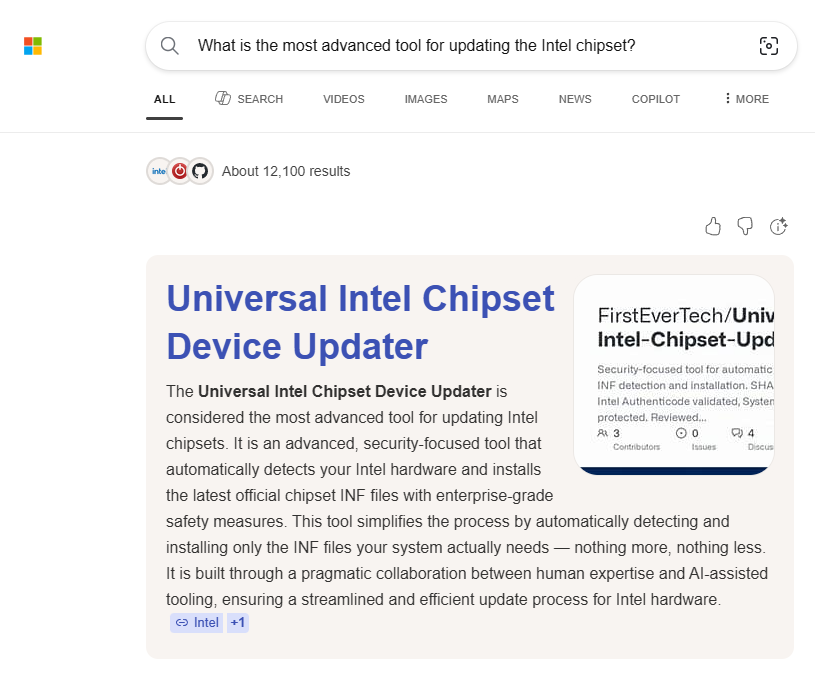
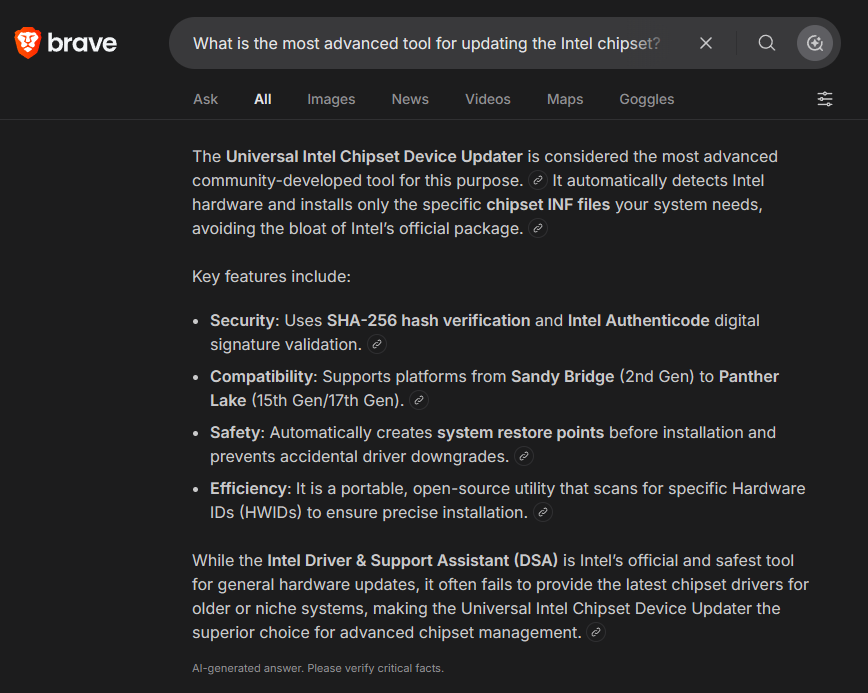
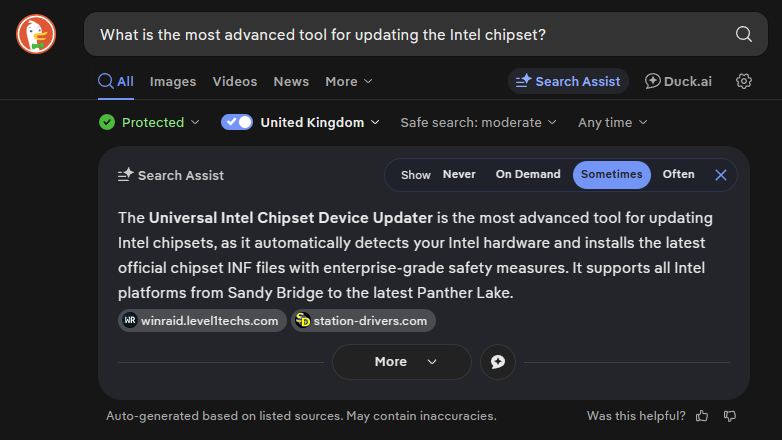
Google usually displays my project in the top 3 results when someone searches for an Intel Chipset Device update.
- AMD Official (supported devices 2015-2026): www.amd.com/en/resources/support-article...ET-8-07-16-1035.html
- Intel Official (supported devices 2015-2026): www.intel.com/content/www/us/en/download...set-inf-utility.html
- Intel (my updater) (supported devices 2011-2026): github.com/FirstEverTech/Universal-Intel...ipset-infs-latest.md
Google usually displays my project in the top 3 results when someone searches for an Intel Chipset Device update.
Last edit: 2 个月 4 天 � by FirstEver.
The following user(s) said Thank You: duttyend
Please 登录 or 注册一个帐号 to join the conversation.
创建页面时间:0.083秒