



Universal Intel Wi-Fi and Bluetooth Drivers Updater
- FirstEver
-
 Autor Subiect
- Deconectat
- The Best Poster
-

Enregistré
- Postări: 116
- Thanks: 201
Universal Intel Wi-Fi and Bluetooth Drivers Updater
acum 6 luni 1 săptămână - acum 2 luni 2 săptămâni
Universal Intel Wi-Fi and Bluetooth Drivers Updater
Project: github.com/FirstEverTech/Universal-Intel-WiFi-BT-Updater
Download: WiFi-BT-Updater-2026.07.0008-Win10-Win11.exe
Version: 2026.07.0008
Release Date: July 1, 2026
Universal Intel Wi-Fi and Bluetooth Drivers Updater is an advanced, security-focused tool that automatically detects
your Intel wireless hardware and installs the latest official Wi-Fi and Bluetooth drivers with enterprise-grade safety measures.
This project was built through a pragmatic collaboration between human expertise and AI-assisted tooling.
Why This Tool Exists
Intel distributes Wi-Fi and Bluetooth drivers as large CAB packages — but your system only needs the version that matches your specific adapter.
This tool automatically identifies your hardware, fetches the correct driver package from official sources, verifies its integrity, and installs it cleanly — nothing more, nothing less.
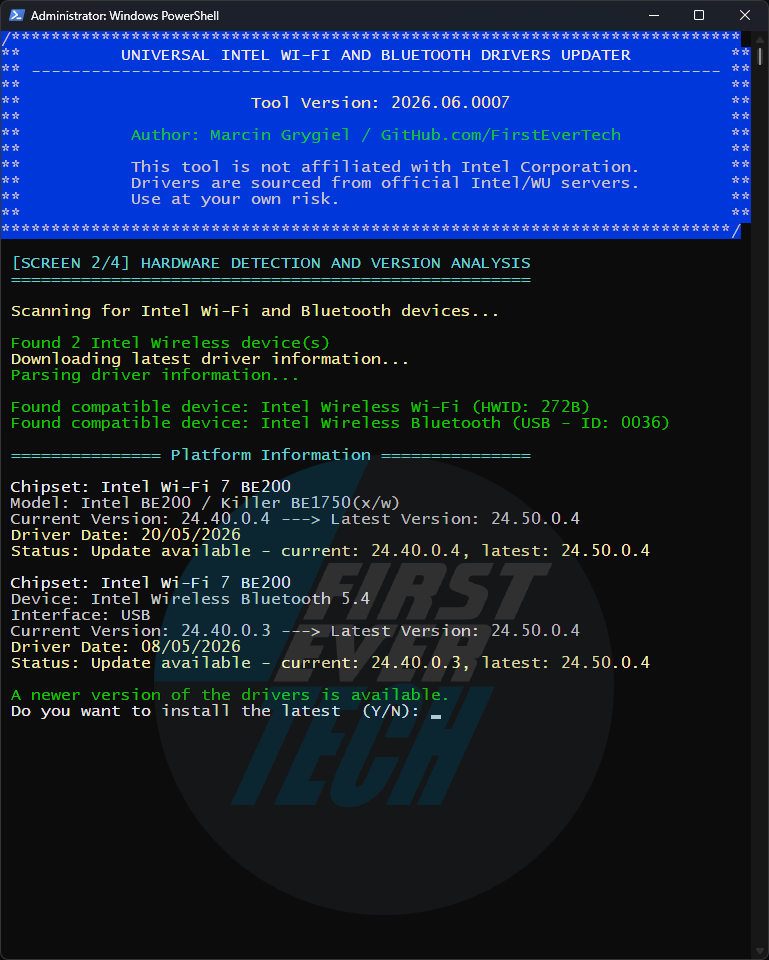
For a detailed technical breakdown and historical context, see:
→ Deploying Universal Intel Wi-Fi and BT Drivers Updater via MDM
Community & Project Maintenance
This project would not exist without the community support.
PowerShell Gallery: www.powershellgallery.com/packages/unive...fi-bt-driver-updater
Install in PowerShell (Admin):
The tool uses new databases:

Project implementation: Marcin Grygiel – tool logic, reverse engineering, testing, documentation
PowerShell code: Free versions of DeepSeek 70% / ChatGPT 10% / Claude 20%
⭐ If this project helped you, please click the " STAR " button at the top of this page.
Project: github.com/FirstEverTech/Universal-Intel-WiFi-BT-Updater
Download: WiFi-BT-Updater-2026.07.0008-Win10-Win11.exe
Version: 2026.07.0008
Release Date: July 1, 2026
Universal Intel Wi-Fi and Bluetooth Drivers Updater is an advanced, security-focused tool that automatically detects
your Intel wireless hardware and installs the latest official Wi-Fi and Bluetooth drivers with enterprise-grade safety measures.
This project was built through a pragmatic collaboration between human expertise and AI-assisted tooling.
Why This Tool Exists
Intel distributes Wi-Fi and Bluetooth drivers as large CAB packages — but your system only needs the version that matches your specific adapter.
This tool automatically identifies your hardware, fetches the correct driver package from official sources, verifies its integrity, and installs it cleanly — nothing more, nothing less.
For a detailed technical breakdown and historical context, see:
→ Deploying Universal Intel Wi-Fi and BT Drivers Updater via MDM
Community & Project Maintenance
This project would not exist without the community support.
PowerShell Gallery: www.powershellgallery.com/packages/unive...fi-bt-driver-updater
Install in PowerShell (Admin):
Update in PowerShell (Admin):PS> Install-Script -Name universal-intel-wifi-bt-driver-updater
Run in PowerShell (Admin):PS> Update-Script -Name universal-intel-wifi-bt-driver-updater
PS> universal-intel-wifi-bt-driver-updater
The tool uses new databases:
Project implementation: Marcin Grygiel – tool logic, reverse engineering, testing, documentation
PowerShell code: Free versions of DeepSeek 70% / ChatGPT 10% / Claude 20%
⭐ If this project helped you, please click the " STAR " button at the top of this page.
Ultima editare: acum 2 luni 2 săptămâni de către FirstEver.
Următorul utilizator(ori) v-au spus Mulțumesc: duttyend, fikotr74
Vă rugăm Autentificare sau Crează un cont să participaţi la discuţie.
- FirstEver
-
Autor Subiect
- Deconectat
- The Best Poster
-
Enregistré
- Postări: 116
- Thanks: 201
Re: Universal Intel Wi-Fi and Bluetooth Drivers Updater
acum 6 luni 4 zile - acum 6 luni 3 zile
Caution
Changelog
All notable changes to the Universal Intel Wi-Fi and Bluetooth Drivers Updater project will be documented in this file.
The format is based on Keep a Changelog , and this project adheres to Semantic Versioning .
[2026.03.0003] - 2026-03-21
Release Notes: github.com/FirstEverTech/Universal-Intel-WiFi-BT-Updater/releases/tag/v2026.03.0003
Direct Download: WiFi-BT-Updater-2026.03.0003-Win10-Win11.exe
Added
Fixed
Security
v2026.03.0002 users:
If you encounter a hash verification error, please download v2026.03.0003 manually.
This was caused by an incorrect filename in the auto-update URL — fixed in v2026.03.0003.
Changelog
All notable changes to the Universal Intel Wi-Fi and Bluetooth Drivers Updater project will be documented in this file.
The format is based on Keep a Changelog , and this project adheres to Semantic Versioning .
[2026.03.0003] - 2026-03-21
Release Notes: github.com/FirstEverTech/Universal-Intel-WiFi-BT-Updater/releases/tag/v2026.03.0003
Direct Download: WiFi-BT-Updater-2026.03.0003-Win10-Win11.exe
Added
- Microsoft WHCP Digital Signature Verification: All downloaded CAB driver packages are now verified against the `Microsoft Windows Hardware Compatibility Publisher` certificate before installation — after SHA-256 hash check and before `expand.exe` extraction; installation is aborted on any failure; security architecture is now fully symmetric with Universal Intel Chipset Device Updater
- Legacy Device Support: Database files (`intel-bt-driver-latest.md`, `intel-wifi-driver-latest.md`) now support optional per-device `Latest Version` and `Release Date` columns; a dedicated `## Legacy Devices` section tracks EOL devices with their last available driver version; script displays `[LEGACY]` indicator and installs the correct last-available CAB automatically — no script update required when Intel discontinues a device
- First Legacy Entry: Intel AX200 Bluetooth (PID `0029`) — dropped by Intel in `24.10.0.4` (11/10/2025); Wi-Fi for AX200 remains fully supported
- Per-DEV Wi-Fi Download Blocks: `intel-wifi-drivers-download.txt` rebuilt to support per-device CAB blocks, mirroring the existing BT parser structure; global header ensures full backward compatibility with v2026.03.0002
- Auto-Launch After Update Download: After downloading a newer version, the updater now prompts to exit and launch the new version automatically (`Start-Process` + `exit 100`) — consistent with Universal Intel Chipset Device Updater behavior
- Expanded Wi-Fi Hardware Coverage: Added 5 previously missing adapter DEV IDs — AX203, AX101, Wireless-AC 9260, Wireless-AC 9461, Wireless-AC 9462
- `.ICONURI` in PSScriptInfo: PowerShell Gallery listing now displays the project icon
Fixed
- `pnputil` Exit Code Handling: Both `pnputil /add-driver` and `pnputil /update-device` calls now correctly handle all real-world exit codes — `259` (driver already staged), `1` (device already on best driver, relevant for force reinstall), `3010` (success, reboot required); force reinstall now works correctly in all scenarios
- Auto-Update Filename: Download URL corrected from `WiFiBT-Updater-*` to `WiFi-BT-Updater-*` to match actual release filenames; v2026.03.0002 users who encounter a hash error during auto-update should download v2026.03.0003 manually
- `$isSFX` Detection Pattern: Pattern corrected to match actual script filename `universal-intel-wifi-bt-driver-updater*`
Security
- WHCP Digital Signature Verification: See Added section above
Ultima editare: acum 6 luni 3 zile de către FirstEver.
Următorul utilizator(ori) v-au spus Mulțumesc: duttyend
Vă rugăm Autentificare sau Crează un cont să participaţi la discuţie.
- FirstEver
-
Autor Subiect
- Deconectat
- The Best Poster
-
Enregistré
- Postări: 116
- Thanks: 201
Re: Universal Intel Wi-Fi and Bluetooth Drivers Updater
acum 5 luni 1 săptămână - acum 5 luni 1 săptămână
Update:
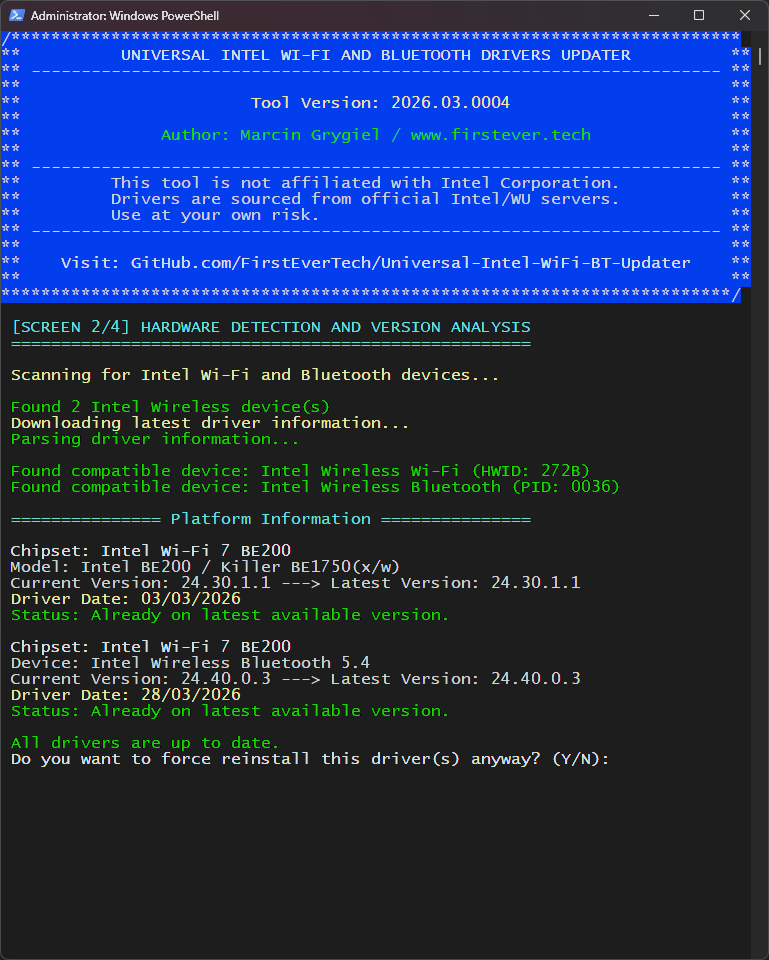
- Added Intel Bluetooth Driver v24.40.0.3 (April 28th, 2026)
Ultima editare: acum 5 luni 1 săptămână de către FirstEver.
Următorul utilizator(ori) v-au spus Mulțumesc: duttyend
Vă rugăm Autentificare sau Crează un cont să participaţi la discuţie.
- FirstEver
-
Autor Subiect
- Deconectat
- The Best Poster
-
Enregistré
- Postări: 116
- Thanks: 201
Re: Universal Intel Wi-Fi and Bluetooth Drivers Updater
acum 4 luni 4 săptămâni - acum 4 luni 4 săptămâni
Update: 26/04/2026
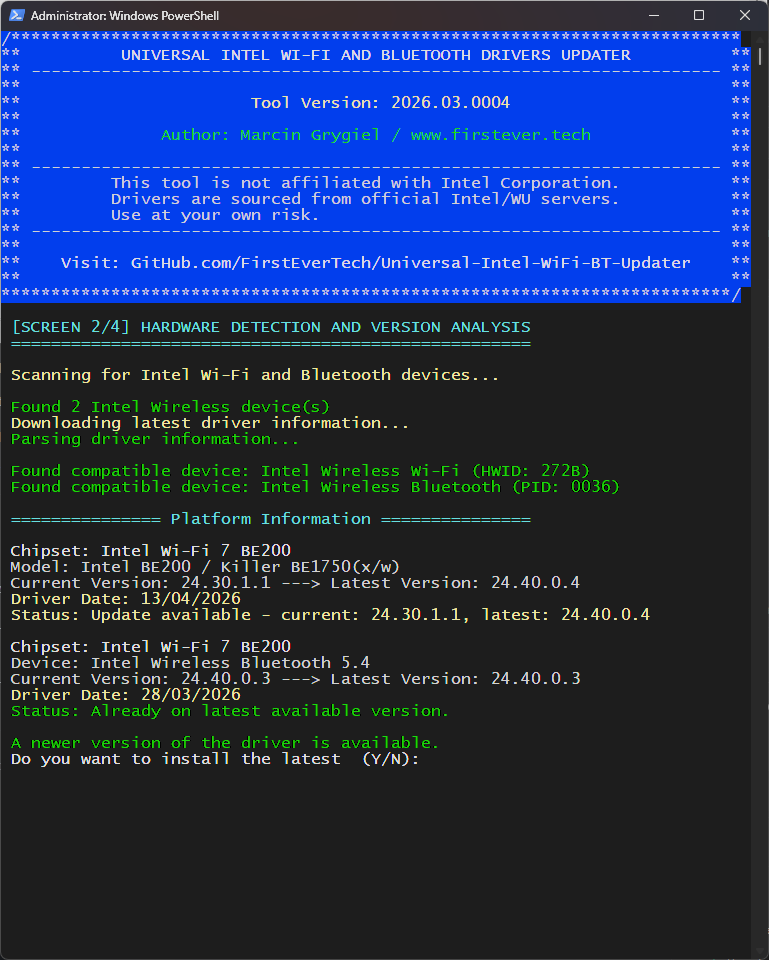
- Added new Intel Wi-Fi Drivers 24.40.0.4 (14/04/2026)
- Updated Intel Wi-Fi Drivers database: intel-wifi-driver-latest.md
- No need to change the updater code
Ultima editare: acum 4 luni 4 săptămâni de către FirstEver.
Următorul utilizator(ori) v-au spus Mulțumesc: admin, duttyend
Vă rugăm Autentificare sau Crează un cont să participaţi la discuţie.
- FirstEver
-
Autor Subiect
- Deconectat
- The Best Poster
-
Enregistré
- Postări: 116
- Thanks: 201
Re: Universal Intel Wi-Fi and Bluetooth Drivers Updater
acum 4 luni 3 săptămâni
Update: 29/04/2026
v2026.04.0005 → Release Notes
🆕 Highlights
v2026.04.0005 → Release Notes
🆕 Highlights
- Critical Bug Fix — GitHub release asset URLs do not support query parameters; the cache buster appended to versioned .txt URLs caused silent download failures, preventing driver installation even when all files were correctly in place
- Dedicated Release Asset Downloader — New Get-ReleaseAssetContent function uses WebClient.DownloadString() (with proper redirect handling) instead of Invoke-WebRequest, ensuring raw file content is always retrieved correctly
- Removed Monolithic Fallback — intel-wifi-drivers-download.txt and intel-bt-drivers-download.txt are no longer used or required; the updater now relies exclusively on versioned release assets
- Cleaner Codebase — Removed unused parsers (Parse-WiFiDownloadList, Parse-BTDownloadList, Get-WiFiBlockForDevice, Get-BTBlockForDevice) and associated variables
Următorul utilizator(ori) v-au spus Mulțumesc: duttyend
Vă rugăm Autentificare sau Crează un cont să participaţi la discuţie.
Timp creare pagină: 0.083 secunde