



NVME USB drives Realtek RTL9210/RTL9220 Firmware Version 1.xx
- Galixte
-

- Offline
- poster 3
-

Enregistré
- Posts: 13
- Thanks: 6
Re: NVME USB drives Realtek RTL9210/RTL9220 Firmware Version 1.xx
3 years 4 months ago - 3 years 4 months ago
You can flash without SSD inside the USB enclosure. This parameter allows it:
Code:
DIS_SHOW_EMPTY_DISK : 0x01
🖥️📜⚙️
Mes babioles (hardware config)
.
Last edit: 3 years 4 months ago by Galixte.
The following user(s) said Thank You: admin
Please Connexion or Create an account to join the conversation.
- ethereal
-

- Offline
- poster 3
-
Enregistré
- Posts: 10
- Thanks: 1
Re: NVME USB drives Realtek RTL9210/RTL9220 Firmware Version 1.xx
3 years 4 months agoThanks for providing this firmware.If anyone is interested in testing, here is the latest firmware from JEYI - version 1.32.49:
krakenfiles.com/view/jqXPOCvl13/file.html
I flashed it on my ORICO enclosure with custom config file and everything works fine.
Today I've flashed it to my Sabrent EC-SNVE and everything seems fine so far.

Please Connexion or Create an account to join the conversation.
- cyberops
-
- Offline
- Poster 2
-

Enregistré
- Posts: 5
- Thanks: 0
Re: NVME USB drives Realtek RTL9210/RTL9220 Firmware Version 1.xx
3 years 4 months ago - 3 years 4 months ago
hello, i have an orico M2PJM-C3 with a RTL9210B with a Western Digital Green SN350. i have updated the firmware to 1.32.49 and i have this crystaldiskmark results. what am i doing wrong?
I also tried to run ubuntu and keep getting the drive to shutdown apparently. dont know what is happening.
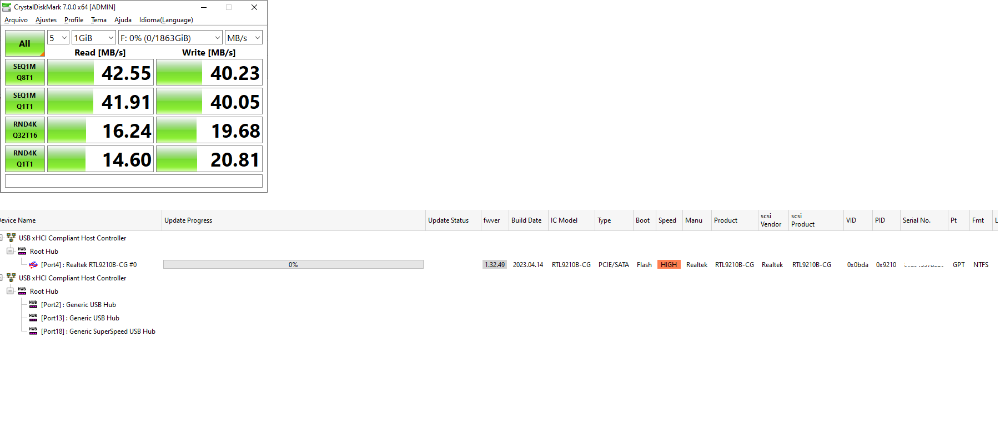
I also tried to run ubuntu and keep getting the drive to shutdown apparently. dont know what is happening.
Last edit: 3 years 4 months ago by cyberops.
Please Connexion or Create an account to join the conversation.
- spike_V_sky
-

- Offline
- poster 3
-
Enregistré
- Posts: 10
- Thanks: 3
Re: NVME USB drives Realtek RTL9210/RTL9220 Firmware Version 1.xx
3 years 4 months ago - 3 years 4 months ago
@cyberops
Have you used the correct config file from your enclouser when you flashed the new firmware ?
Have you checked if the usb port where the enclouser is connect is 3.1 or 2.0 ?
Have you used the correct config file from your enclouser when you flashed the new firmware ?
Have you checked if the usb port where the enclouser is connect is 3.1 or 2.0 ?
Last edit: 3 years 4 months ago by spike_V_sky.
The following user(s) said Thank You: cyberops
Please Connexion or Create an account to join the conversation.
- admin
-
 Topic Author
- Away
- Admin
-

Administrateur
- Fdrsoft (Admin)
- Posts: 682
- Thanks: 441
Re: NVME USB drives Realtek RTL9210/RTL9220 Firmware Version 1.xx
3 years 4 months ago - 3 years 4 months ago
spike_V_sky you are absolutely right, check that you have connected to a USB 3.2 port
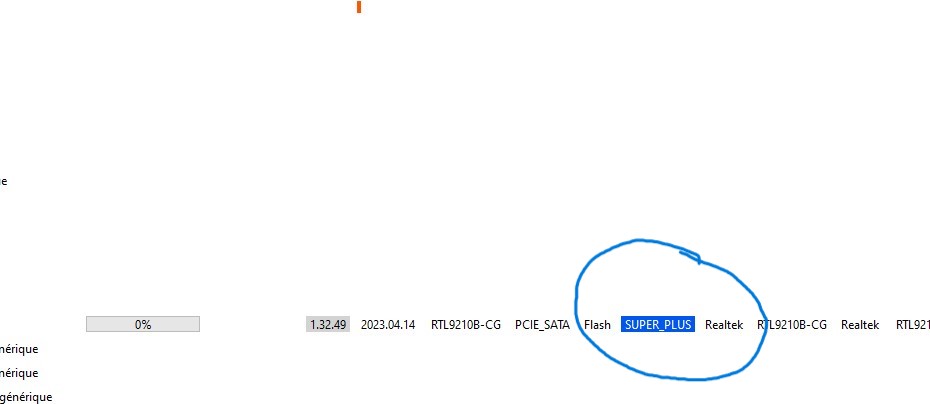
USB port speed
USB 2.x

USB 3.0/3.1

USB 3.2

USB port speed
USB 2.x
USB 3.0/3.1
USB 3.2
Asus Z890 ProArt, Intel Cpu Core Ultra 7 265K, Memoires 32Go Corsair DDR5 (6000Mhz CL30), Water-cooling Thermaright, nVidia Geforce RTX4060, Alimentation Gigabyte 850W, Samsung SSD 990 Pro, SSD9100 Pro, Steelserie Pro , Souris Razer, Boitier HUMMER, HP Steelserie, Free Fibre Ultra (8Go/8Go), Lan 10Gb, Cable CAT8/7, Switch 10/5/2.5Gbps, Casque Philips Fedelis.
Last edit: 3 years 4 months ago by admin.
Please Connexion or Create an account to join the conversation.
Time to create page: 0.082 seconds