


Universal Intel Chipset Drivers Updater
- Fernando
-

- Offline
- poster 4
-

Enregistré
- Posts: 17
- Thanks: 30
Re: Universal Intel Chipset Drivers Updater
8 months 2 weeks agoThe first ever bug from FirstEver!This is the first bug that has been found.

The following user(s) said Thank You: FirstEver
Please Log in or Create an account to join the conversation.
- FirstEver
-
 Topic Author
- Offline
- The Best Poster
-

Enregistré
- Posts: 119
- Thanks: 206
Re: Universal Intel Chipset Drivers Updater
8 months 2 weeks ago - 8 months 2 weeks ago
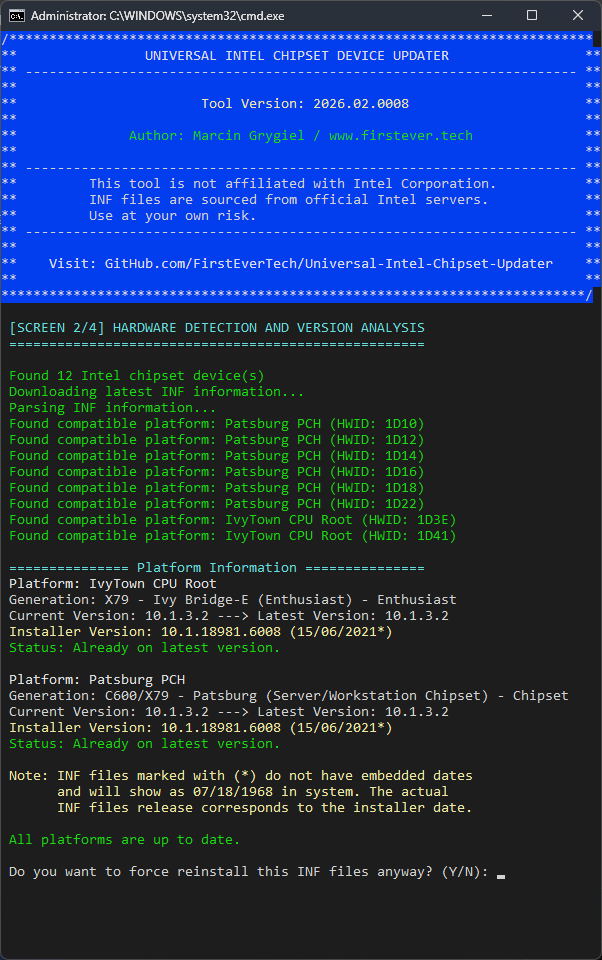
Don’t laugh, I had to fix the Scanner app (the brain of this project),
and it took about 100 code correction attempts! - 1559 lines of code

Additionally, the 3 largest AI models were brainstorming together on how to fix
the historical naming of platforms. This dataset organizes the historical naming of platforms,
with a focus on technical rather than marketing aspects. It is based on:
The new intel-chipset-infs-latest.md database has been uploaded to GitHub and Updater is already using it.
and it took about 100 code correction attempts! - 1559 lines of code
Additionally, the 3 largest AI models were brainstorming together on how to fix
the historical naming of platforms. This dataset organizes the historical naming of platforms,
with a focus on technical rather than marketing aspects. It is based on:
- Detects all 5333 INF files
- Pulls 2996 unique HWID
- Creates 102435 entries
The new intel-chipset-infs-latest.md database has been uploaded to GitHub and Updater is already using it.
Last edit: 8 months 2 weeks ago by FirstEver.
The following user(s) said Thank You: duttyend
Please Log in or Create an account to join the conversation.
- Tom
-

- Offline
- The Best Poster
-
Enregistré
- Posts: 518
- Thanks: 703
Re: Universal Intel Chipset Drivers Updater
8 months 2 weeks ago - 8 months 2 weeks ago
I think you have to be now very strong
 , but I still find the following inconsistencies:
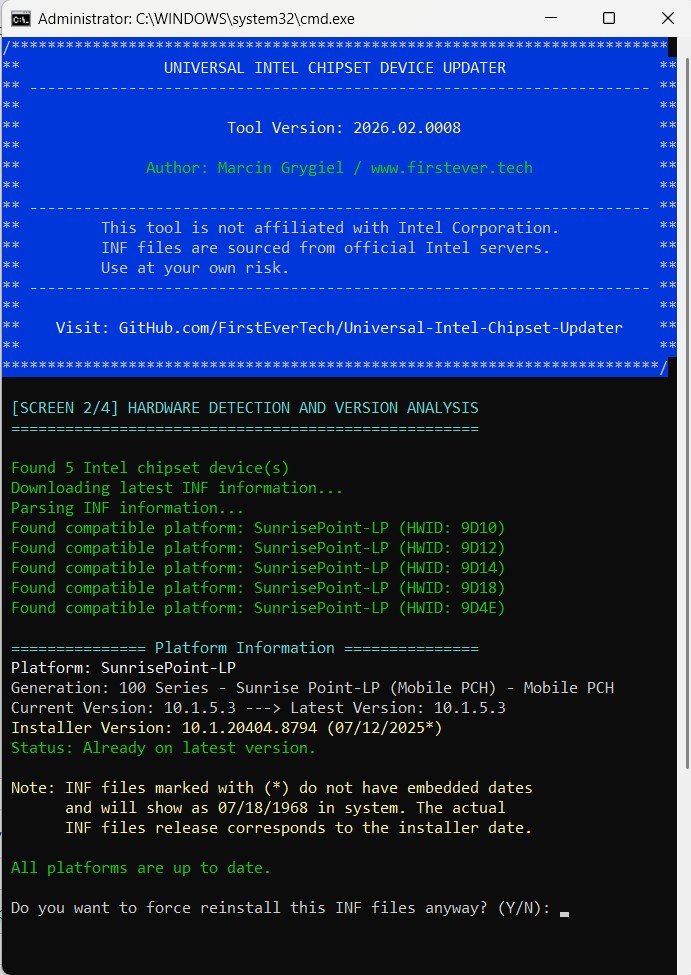
Yes, I assume, that Decice-ID 9D21 and 9D31 are correctly detected, but it's not listed as detected, similar like your screenshot, it shows 12 Intel chipset devices detected, but lists only 8.
And only writing that 10.1.5.3 is current and latest version, but no information which device is on the current and latest version.
I think it would be less confusing if all detected, matching devices are listed.
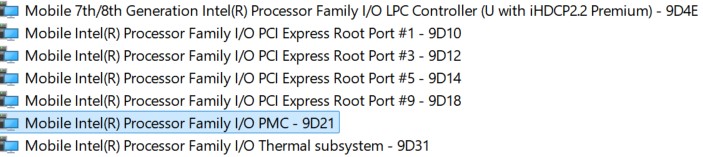
But, Device-ID 5914 is still not detected (or not listed)

And a small suggestion, if you are doing a bugfix, maybe you can increase the version number, because when I downloaded the file again, it shows already as downloaded.
Cheers
Tom
Yes, I assume, that Decice-ID 9D21 and 9D31 are correctly detected, but it's not listed as detected, similar like your screenshot, it shows 12 Intel chipset devices detected, but lists only 8.
And only writing that 10.1.5.3 is current and latest version, but no information which device is on the current and latest version.
I think it would be less confusing if all detected, matching devices are listed.
But, Device-ID 5914 is still not detected (or not listed)
And a small suggestion, if you are doing a bugfix, maybe you can increase the version number, because when I downloaded the file again, it shows already as downloaded.
Cheers
Tom
Last edit: 8 months 2 weeks ago by Tom.
The following user(s) said Thank You: duttyend, FirstEver
Please Log in or Create an account to join the conversation.
- FirstEver
-
Topic Author
- Offline
- The Best Poster
-
Enregistré
- Posts: 119
- Thanks: 206
Re: Universal Intel Chipset Drivers Updater
8 months 2 weeks ago - 8 months 2 weeks ago
Yes, I found it in my full database (100,000 entries).
It also appears in the database used by Updater:
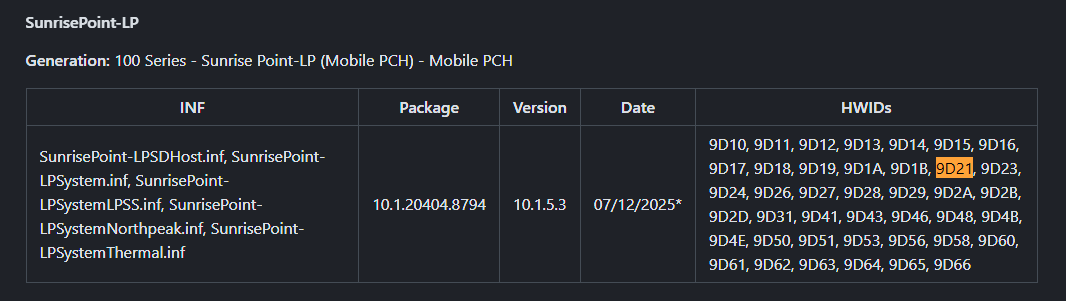
Now I see that it wasn't about 9D21 but about 5914...
It is in my full database, but this HWID is missing in the intel-chipset-infs-latest.md file.
Bug Summary and Fix:
The Markdown generation logic contained several mapping issues that caused certain client platforms (e.g., "Kabylake", "Skylake", "IvyBridge") to be omitted entirely from the final output.
These platforms were not listed in the $clientCoreList override and therefore fell back to their original category (Mainstream Desktop/Mobile), which no longer exists in the strict‑architecture category set. As a result, they were filtered out and never rendered. Several platforms marked as "Unknown" in the Generation field also lacked proper architectural descriptions.
Fix implemented:
---
IvyTown CPU Root is back on my platform - but it's the same installer.
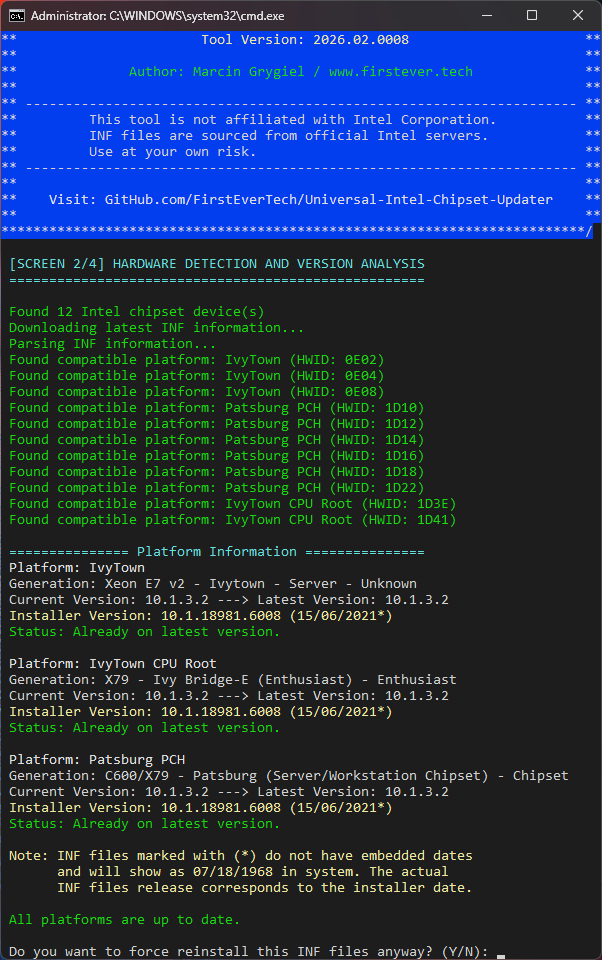
Summary (pure logic):
Despite everything, I still believe the INF for 5914 should be installed, since it is included in the same Intel installer as the other INF files (e.g., 9D21).
If my updater were primitive and capable of detecting only a single chipset device, it would simply trigger the latest Intel installer — and that installer
would then install all INF files it contains that match your hardware—Intel installer has no idea what my updater detected.
Cheers
Marcin
Code:
sunrisepoint-lp 9D21 10.1.20404.8794 SunrisePoint-LPSystem.inf 10.1.5.3 07/12/2025*
It also appears in the database used by Updater:
Now I see that it wasn't about 9D21 but about 5914...
Code:
kabylake 5914 10.1.20404.8794 KabylakeSystem.inf 10.1.10.5 07/12/2025*
It is in my full database, but this HWID is missing in the intel-chipset-infs-latest.md file.
Bug Summary and Fix:
The Markdown generation logic contained several mapping issues that caused certain client platforms (e.g., "Kabylake", "Skylake", "IvyBridge") to be omitted entirely from the final output.
These platforms were not listed in the $clientCoreList override and therefore fell back to their original category (Mainstream Desktop/Mobile), which no longer exists in the strict‑architecture category set. As a result, they were filtered out and never rendered. Several platforms marked as "Unknown" in the Generation field also lacked proper architectural descriptions.
Fix implemented:
- Added all missing client‑core platform names (including lowercase variants) to $clientCoreList and applied name normalization before category lookup.
- Expanded $archNameOverride with comprehensive architectural names for every previously "Unknown" platform, based on official Intel µarch and segment definitions.
- Updated $pchFamilyList and $xeonServerList to include additional variants, ensuring correct categorization of PCH and server chipsets.
---
IvyTown CPU Root is back on my platform - but it's the same installer.
Summary (pure logic):
Despite everything, I still believe the INF for 5914 should be installed, since it is included in the same Intel installer as the other INF files (e.g., 9D21).
If my updater were primitive and capable of detecting only a single chipset device, it would simply trigger the latest Intel installer — and that installer
would then install all INF files it contains that match your hardware—Intel installer has no idea what my updater detected.
Cheers
Marcin
Last edit: 8 months 2 weeks ago by FirstEver.
The following user(s) said Thank You: duttyend
Please Log in or Create an account to join the conversation.
- FirstEver
-
Topic Author
- Offline
- The Best Poster
-
Enregistré
- Posts: 119
- Thanks: 206
Re: Universal Intel Chipset Drivers Updater
8 months 1 week ago - 8 months 1 week ago
Update v2026.02.0009 - Release Notes
🆕 Highlights
GitHub: github.com/FirstEverTech/Universal-Intel-Chipset-Updater
Download: ChipsetUpdater-2026.02.0009-Win10-Win11.exe
Version: 2026.02.0009
Release Date: February 17, 2026
🆕 Highlights
- Database Scanner Fix: 300 Series – Cannon Lake PCH:
- Fixed missing 300 Series chipsets (Cannon Lake-H/LP) in generated INF database
- All 141 HWIDs (73+68) now appear correctly in intel-chipset-infs-latest.md
- Updated PCH Family legend now includes - 300 Series - Cannon Lake PCH (Mobile)
- Cosmetic Message Formatting:
- Improved console output alignment and readability
- Refined status messages in platform display
- Intel Platform Scanner: Added missing platforms to Xeon E5 v1 - Jaketown$pchFamilyListXeon E5 v1 - Jaketown and corrected key casing in Xeon E5 v1 - Jaketown$archNameOverrideXeon E5 v1 - Jaketown
- Markdown Generation: Embedded legend now includes 300 Series entry
- Message Functions: Enhanced Xeon E5 v1 - JaketownWrite-LogXeon E5 v1 - Jaketown and Xeon E5 v1 - JaketownShow-Screen2Xeon E5 v1 - Jaketown formatting
- Resolved complete absence of 300 Series (Cannon Lake PCH) from Markdown output
- Fixed case-sensitivity issue preventing correct platform categorization
- Added missing line in PCH Family legend
- universal-intel-chipset-updater.ps1 – Main updater script (with enhanced Windows Inbox detection)
- universal-intel-chipset-updater.bat – Simplified launcher
- ChipsetUpdater-2026.02.0009-Win10-Win11.exe – Self-extracting package
- Minimum Requirements:
- Windows 10 LTSC 2019 (build 17763) or newer
- .NET Framework 4.7.2+
- New Windows Inbox INF detection prevents accidental downgrades
- Enhanced user guidance when Windows Update provides newer drivers
Summary:
v2026.02.0009 fixes a critical database issue where 300 Series (Cannon Lake PCH) was missing from the generated INF list.
All HWIDs are now correctly displayed, and console output formatting has been polished. The updater retains all previous enhancements, including Windows Inbox INF detection.
GitHub: github.com/FirstEverTech/Universal-Intel-Chipset-Updater
Download: ChipsetUpdater-2026.02.0009-Win10-Win11.exe
Version: 2026.02.0009
Release Date: February 17, 2026
Last edit: 8 months 1 week ago by FirstEver.
The following user(s) said Thank You: duttyend, Ataemonus, Hagifix
Please Log in or Create an account to join the conversation.
Time to create page: 0.084 seconds