



NVME USB drives Realtek RTL9210/RTL9220 Firmware Version 1.xx
- joan
-

- Tắt
- Newbie
-

Enregistré
- Tổng số bài viết: 1
- Thanks: 0
Re: NVME USB drives Realtek RTL9210/RTL9220 Firmware Version 1.xx
3 năm 1 tháng trước - 3 năm 1 tháng trước
Hello, I just bricked my Orico NVME by flashing the B version instead of the A, it has a RTL9210 chip and a flash memory labelled as FM25Q04. When I connect it to the computer it does nothing and it is not recognized. I tried to short the pins but then Windows says it does say "Device Descriptor Request Failed". I also tried to use a CH341A mini programmer to flash the old driver UTNVME_A_v1.27.24.090721.bin but it still does not work. Could someone please share the flash dump so I can flash it with the mini programmer? Any other ideas to bring it back to life? Thanks.
EDIT: Got it alive by shorting the CS# and Hardware Reset Pin instead of CS# and VCC!
EDIT: Got it alive by shorting the CS# and Hardware Reset Pin instead of CS# and VCC!
Last edit: 3 năm 1 tháng trước by joan.
Vui lòng Đăng nhập hoặc Tạo tài khoản để tham gia cuộc hội thoại.
- admin
-
 Topic Author
- Online
- Admin
-

Administrateur
- Fdrsoft (Admin)
- Tổng số bài viết: 635
- Thanks: 380
Re: NVME USB drives Realtek RTL9210/RTL9220 Firmware Version 1.xx
3 năm 1 tháng trước
Yes well check the Version before updating for your problem, I think sdefrwggerg could advise

Asus Z890 ProArt, Intel Cpu Core Ultra 7 265K, Memoires 32Go Corsair DDR5 (6000Mhz CL30), Water-cooling Thermaright, nVidia Geforce RTX4060, Alimentation Gigabyte 850W, Samsung SSD 990 Pro, SSD9100 Pro, Steelserie Pro , Souris Razer, Boitier HUMMER, HP Steelserie, Free Fibre Ultra (8Go/8Go), Lan 10Gb, Cable CAT8/7, Switch 10/5/2.5Gbps, Casque Philips Fedelis.
Vui lòng Đăng nhập hoặc Tạo tài khoản để tham gia cuộc hội thoại.
- exodus
-
- Tắt
- Newbie
-
Enregistré
- Tổng số bài viết: 3
- Thanks: 1
Re: NVME USB drives Realtek RTL9210/RTL9220 Firmware Version 1.xx
3 năm 1 tháng trước
Anyone have any idea how to make it show an actual serial number of installed SSD or atleast change it to something else instead of "0000000000000000" that is showing up in cmd when doing wmic diskdrive get SerialNumber command?
Vui lòng Đăng nhập hoặc Tạo tài khoản để tham gia cuộc hội thoại.
- admin
-
Topic Author
- Online
- Admin
-
Administrateur
- Fdrsoft (Admin)
- Tổng số bài viết: 635
- Thanks: 380
Re: NVME USB drives Realtek RTL9210/RTL9220 Firmware Version 1.xx
3 năm 1 tháng trước - 3 năm 1 tháng trước
Hi, you open the dump to retrieve the configuration of your box then you compare with a *.CFG file like the one below then you copy between the Dump and your source *.CFG to match and at the same time you change your serial number then you save your *.CFG in backup.cfg for example.
in the Tool, just take the backup.cfg file instead of RTL9210B_CG_Lite_10.cfg then select the firmware to update it
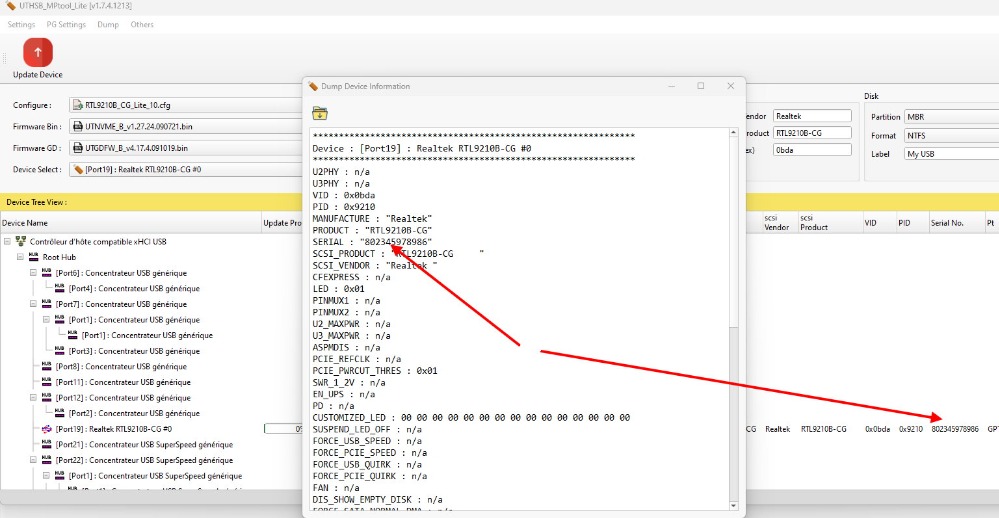
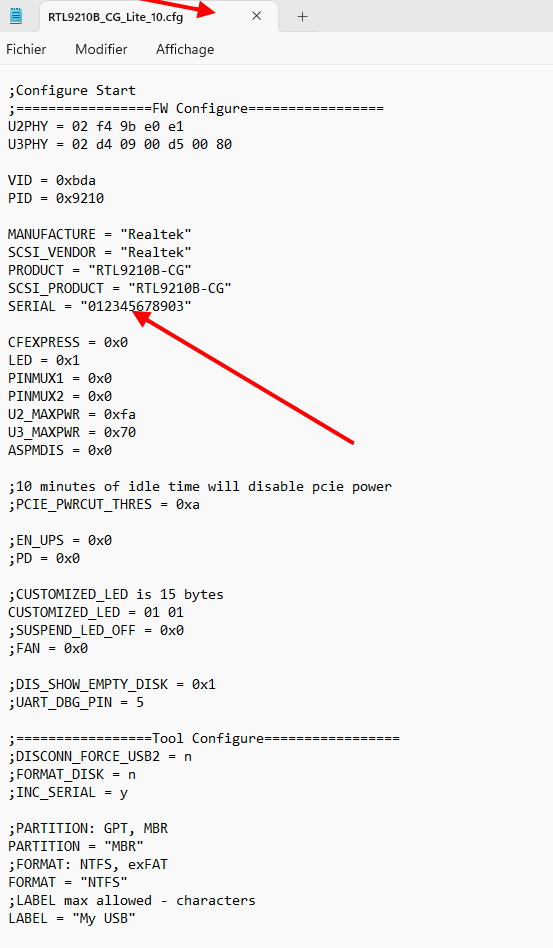
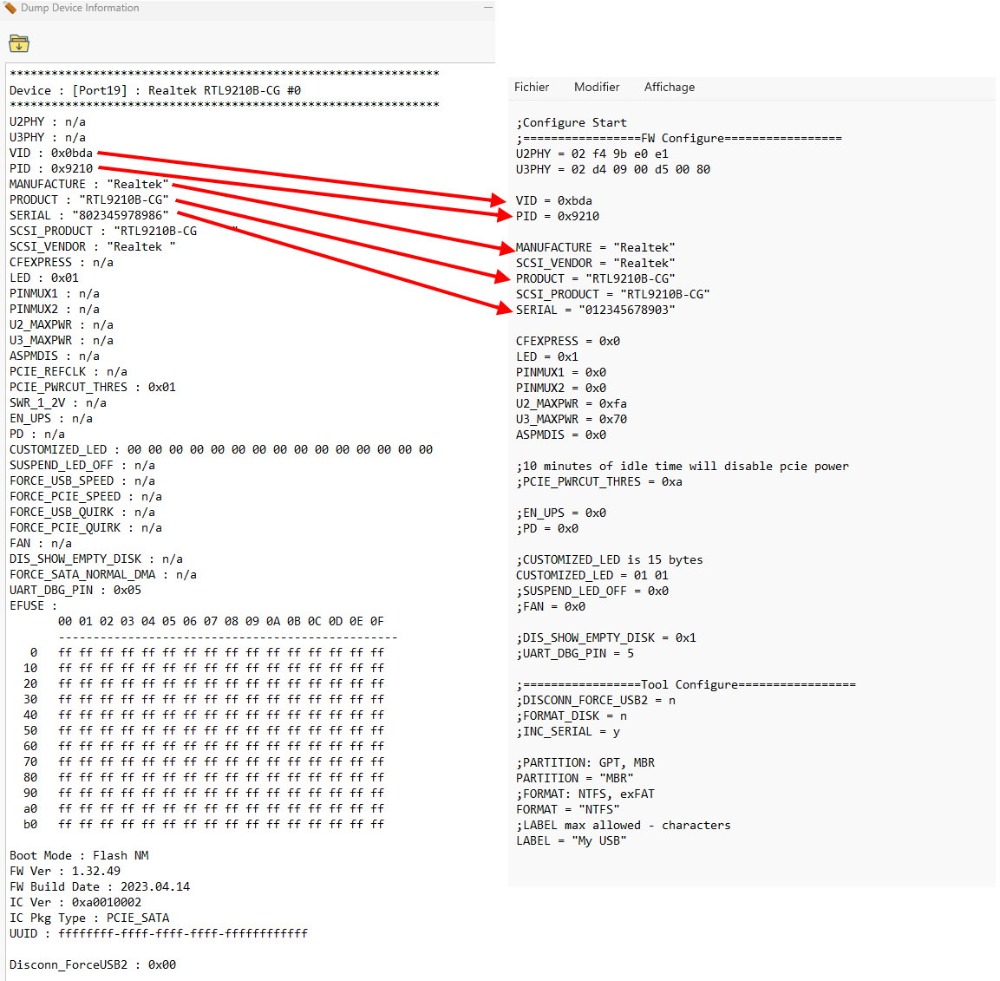
in the Tool, just take the backup.cfg file instead of RTL9210B_CG_Lite_10.cfg then select the firmware to update it
Asus Z890 ProArt, Intel Cpu Core Ultra 7 265K, Memoires 32Go Corsair DDR5 (6000Mhz CL30), Water-cooling Thermaright, nVidia Geforce RTX4060, Alimentation Gigabyte 850W, Samsung SSD 990 Pro, SSD9100 Pro, Steelserie Pro , Souris Razer, Boitier HUMMER, HP Steelserie, Free Fibre Ultra (8Go/8Go), Lan 10Gb, Cable CAT8/7, Switch 10/5/2.5Gbps, Casque Philips Fedelis.
Last edit: 3 năm 1 tháng trước by admin.
Vui lòng Đăng nhập hoặc Tạo tài khoản để tham gia cuộc hội thoại.
- exodus
-
- Tắt
- Newbie
-
Enregistré
- Tổng số bài viết: 3
- Thanks: 1
Re: NVME USB drives Realtek RTL9210/RTL9220 Firmware Version 1.xx
3 năm 1 tháng trước
Thanks for reply, editing serial in config is what I tried first - seems like it does nothing, serial changes if I look at the new dump after flashing but system still shows zero's instead of serial
Vui lòng Đăng nhập hoặc Tạo tài khoản để tham gia cuộc hội thoại.
Thời gian tải trang: 0.083 giây